If you are working with data manipulation in Python, you will frequently need to convert a list to a string. Whether you are dealing with a list of characters, integers, or mixed data types, Python offers multiple ways to handle this. In this tutorial, we will explore the best methods to convert a list to a string in Python, including .join(), map(), and list comprehension complete with code examples.
In this course, you will learn the fundamentals of Python: from basic syntax to mastering data structures, loops, and functions. You will also explore OOP concepts and objects to build robust programs.
What are Lists?
A list is a collection of objects that are ordered. Also, each element in the list is indexed according to a definite sequence, and a list's indexing is done with 0 being the first index.
The list is a ‘Collection Datatype’ that can contain integers, strings, or other lists too. Lists are mutable, hence, they can be changed even after their creation. Also, note that lists can contain duplicate entries, unlike sets. Python lists can be created in the following way:
EmptyList=[] #EmptyList
listOfnumbers=[1,3,56,78] #List of numbers
listOfObjects=[1,"anything",["lists","in","lists"],2.5] # List containing different data types
print(EmptyList)
print(listOfnumbers)
print(listOfObjects)
Try Yourself. Let’s Play with Some Lists. Click Here
What are ‘Strings’?
So, what exactly are strings? Strings are one of the data types in Python and can be defined as a sequence of characters. There is a built-in class ‘str’ for handling a Python string. Creating strings is as simple as assigning a value to a variable. For example −
first_name='''Ted '''
middle_name="Evelen "#commonly used method
last_name='Mosby'#commonly used method
print(first_name,middle_name,last_name)
Try it yourself. Let's make some Names
As can be seen in the example above, there are three ways in which we can create a string. Although double quotes and single quotes are more often used than triple quotes, what if the string contains a single quote or double quotes? Let us find out in the example below.
string_1="Hello "Python" "string_1='Hello "Python"'
print(string_1)string_2='Let's go to the park'string_2="Let's go to the park"
print(string_2)string_3='''Let's go the "PARK"'''
print(string_3)In the above example, we learned how to avoid such errors, now moving on to the question “how to convert a list to a string?”
Convert List to String
Several methods can be used to convert a list to a string.
Method 1: Using the .join() Method (Best for String Lists)
By using the in-built method of python .join()
Name=["Ted","Evelen","Mosby"]
print(" ".join(Name))#used a space to separate list elements here.
Students=["Barney","Robin","Lily"]
print("\n".join(Students))NOTE: If the list contains any non-string element, the above method does not work unless we use map() function to convert all elements to a string first. Let’s see an example:
test_list=["I","have",2,"numbers","and",8,"words","in","this","list"]
print(" ".join(map(str,test_list)))Method 2: Using the str() Function
Using the str() method
Numbers = [1, 56, 87, 22.3, 76]
print(str(Numbers))
# Use string slicing to remove the brackets
print(str(Numbers)[1:-1])
# Or use the strip() function
print(str(Numbers).strip('[]'))Method 3: Using List Comprehension
Using the List comprehension method
test_list=["I","have",2,"numbers","and",8,"words","in","this","list"]
listToStr = ' '.join([str(element) for element in test_list ])
print(listToStr)
Click Here and Run it yourself
Once you understand how to manipulate lists and strings, the best way to solidify your coding skills is by hands-on practice. Try out Python Exercise to test your data structure conversions in real-time.
Method 4: Using Join Function
Python comes with an inbuilt function JOIN(), to convert a list into a string. The join () function combines the elements of a list using a string separator. It is one of the simplest ways to convert a list into a string using Python. However, it should be kept in mind that it only converts a list into a string when the list contains string elements in it.
string_separator.join(name_of_list)
Now to understand the function better, let's see an example below:
my_list = [‘how’, ‘to’, ‘convert’, ‘into’, ‘string’]

‘ ‘.join(list)
Output:
‘how to convert into string’
In the example above, the list contains string elements in it and the next line is used to convert it into a single string using the join function. The blank space used in single quotes before initiating the join function is used to give a space between the items of a list.
If your list contains non-string elements (like integers), you must convert them to strings before joining. You can achieve this using a generator expression inside the .join() method:
my_list = [1,3,5,7,9]

‘ ‘.join(str (e) for e in list)
Output:
‘1 3 5 7 9’
Here the datatype was different as the elements were not strings, and therefore, we needed to convert them into the list first using the str() function with an iterable over all elements of the list using for loop. This way, it converted it into individual strings first and then converted into a single string.
While the join() method is the simplest way to convert a list into a string, it only works if all the items in your list are already strings. This highlights the importance of understanding 'data types'—one of the first things every new coder should learn. If you want a gentle, hands-on introduction to these core concepts, our Free Python Course offers a clear roadmap. It is tailored for beginners to ensure they have a rock-solid foundation in the basics before they tackle more advanced operations.
Python Fundamentals for Beginners Free Course
Master Python basics, from variables to data structures and control flow. Solve real-time problems and build practical skills using Jupyter Notebook.
Method 5: Traversal of a List Function
This is another method of converting a list into a string by traversing through each element in the string using for loop and combining it with the previous element until the list becomes empty. And finally, it returns a single string as an output. See the example below to understand the concept more clearly.
Example:
my_list = [‘learn’, ‘with’, ‘great’, ‘learning’, ‘academy’]

single_string = ‘ ‘

for i in my_list:
	single_string += ‘ ‘ + i

print(single_string)
Output:
learn with great learning academy
In the above example, the for loop iterated through each element in the list and concatenated in a single string which was our final result.
Method 6: Using the map() Function for Mixed Data Types
There can be two possible scenarios where you can use the map() function to convert a list to a string. These two cases include when the list has only numbers and the other if the list is heterogeneous. See an example below:
my_list = [‘Hi’, ‘Ashu’, ‘how’, ‘are’, ‘you’, ‘?’]

str_ing = ‘ ‘.join(map(str, my_list))

print(str_ing)
Output:
Hi Ashu how are you ?
Here the map function needs two arguments, such that the first is the datatype where you need to give str to convert into a string, and the other is the name of the list. Now, the map function first calls each element in an iterable sequence using the str() function that converts each element into a string. Finally, the join function combines each element into a single string.
Method 7: Method 7: Iterating Through the List
This method is very simple, where we just need to traverse through each element in the list using for loop and adding each element to our string variable. See the python code below for a better understanding:
my_list = [‘Hi’, ‘Ashu’, ‘How’, ‘are’, ‘you’, ‘?’]

my_string = “”

for x in my_list:

my_string += x + ‘’

print(my_string)
Output:
Hi Ashu How are you ?
Method 8: Handling Edge Cases (Lists with None or Floats)
In real-world data, your list might contain empty values (None) or decimals. Attempting a standard .join() will throw a TypeError. You must filter or map these values first:
mixed_list = ["Python", None, 3.14, "List"]
clean_string = " ".join([str(item) for item in mixed_list if item is not None])
print(clean_string)
Python 3.14 ListBefore moving on to more complex data structures, take a quick Python Quiz to see how well you've grasped core syntax and string manipulation techniques.
Convert a list of integers into a single integer
Given a list of integers like[1,2,3], can we convert it into a single integer, 123? Sure, we can.
Let’s find out some methods to do so
Method 1
Using the join() method of Python
We can use the join () method and the inbuilt int() in Python. Let us see some examples to understand better.
list_1 = [1, 2, 3]
numbers_str = [str(i) for i in list_1] #Using list comprehension
print(numbers_str)
#Now that the elements have been converted to strings we can use the join method
number= int("".join(numbers_str)) #convert final string to integer
print(number)
Try out some examples yourself. Click here
Method 2
The second method is much more naive and is best suited when we want to just display the number instead of storing it in a variable as shown in method 1. Let us see how to do this:
list_1 = [12, 15, 17]
# iterating each element
def toNumber(anyList):
    for i in anyList:
        print(i, end="")
    print("")#This print statement by default prints a new line
toNumber(list_1)
toNumber([1,8,4,99])
#Note that the number is not stored anywhere.
Click Here and Practice with the above code
Convert String to List
As we have seen different ways to convert a list to a string. Now, we will understand to convert a string to a list in python. There are various ways to convert a string in Python.
Conversion of one data type to other can be done using python. But converting string to list is not as simple as a data type conversion. Some common list conversion methods are split() and list(). Let us see both of these methods to convert a string to a list.
Using Split():
The split() method is very useful that dividing the string based on a specified delimiter. Such that the string is divided and stored in a list. The built-in method of python is used to return a list of words in the string with the help of a specified delimiter.
Syntax:
my_string.split(delimiter, maxsplit)Here are the parameters: delimiter and max split are optional, where if you don’t specify delimiter, then it will automatically take white space as a delimiter, and max split is used to split maximum times. You can also specify the number of splits that you want to carry out in the string.
Example:
my_string = “Hi Great Learner how are you doing”
my_list = my_string.split()
print(my_string)
Output:
[‘Hi’, ‘Great’, ‘Learner’, ‘how’, ‘are’, ‘you’, ‘doing’]Explanation:
Here, we didn’t specify the delimiter and max split. Therefore, it took the default delimiter as white space and did the split of the whole string.
Using list():
This method is also used to convert a string to a list. This is one of the most common ways to convert a string. However, we recommend using this method only when you want to split the string into a list of characters. The list method divides the string into characters. See the example below to understand it completely.
Example:
my_string = “Convert string to list of characters”
my_list = list(my_string.strip(“ “))
print(my_list)
Output:
[‘C’, ‘o’, ‘n’, ‘v’, ‘e’, ‘r’, ‘t’, ‘ ‘, ‘s’, ‘t’, ‘r’, ‘i’, ‘n’, ‘g’, ‘ ‘, ‘t’, ‘o’, ‘ ‘, ‘l’, ‘i’, ‘s’, ‘t’, ‘ ‘, ‘o’, ‘f’, ‘ ‘, ‘c’, ‘h’, ‘a’, ‘r’, ‘a’, ‘c’, ‘t’, ‘e’, ‘r’, ‘s’]Explanation: Here, the string is divided into characters and stored in a list variable. It can be seen that white space is also taken as a single character in the string.
We can use the in-built function split() to convert a string to a list. Let us see some examples:
string_1="Let us convert string to list"
print(string_1.split(" "))# Here we specified " " as delimiter
#Based on the specified delimiter the list string will be sepatrated
string_2="Let*us*convert*string to*list"
print(string_2.split())#By default delimiter is space " "
print(string_2.split("*"))#Here we specified * as the delimiterIn the last line of output, it can be seen that the element ‘string to’ is not separated. The reason being that the delimiter specified is asterisk ‘*’ not space “ ”.
Convert String to List of characters
As discussed above, a String is a sequence of characters. We can convert it to the list of characters using list() built-in function. When converting a string to a list of characters, whitespaces are also treated as characters. Also, if there are leading and trailing whitespaces, they are a part of the list elements too.
Let us see some examples:
string_1=' Great! *^& '
print(list(string_1))
print(list(string_1.strip()))
Try the code above. Click here to practice
The strip function is used to leave out all leading and trailing whitespace, but the spaces in the middle are not left out.
Convert a list of characters into a string
Converting a list of characters into a string is quite similar to converting a list of integers into a number which is already shown above. So let us see how it is done
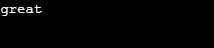
To convert a list of characters like [g,r,e,a,t] into a single string 'great',we use the join() method as shown below
chars=['g','r','e','a','t']
string1=''.join(chars)
print(string1)
Output:
This brings us to the end of this article, where we have learned how we can convert lists to strings and much more. If you wish to learn more about Python fundamentals and the concepts of Machine Learning, upskill with Great Learning’s PG Program in Machine Learning.
Conclusion
Converting data types is a fundamental skill you'll use constantly when building real-world applications. If you're ready to put these concepts to work and build your portfolio, start developing some of these Top Python Projects for Beginners
Frequently Asked Questions
You can turn a list into a string using the .join() method combined with list comprehension: "".join([str(item) for item in my_list]). The str() function ensures all elements, including integers, are safely converted to string format before joining them together.
You can use one-liner strings = [str(x) for x in ints] to convert a list of integers into a list of strings.
A string in Python is a collection of characters. By utilising the built-in function list(), we may convert it to a list of characters. Whitespaces are also considered characters when converting a string to a list of characters.