In a real-world machine learning environment, tools are not standalone items. They are part of a strictly defined pipeline.
You need specific tools for specific stages: Training, Data Management, Experiment Tracking, and Production Serving.
- If you choose the wrong tool at the "Data" stage, you will get Out-Of-Memory (OOM) errors during the "Training" stage.
- If you ignore the "Serving" stage tools, your model will be too slow for users, no matter how accurate it is.
This guide covers the high-performance stack used by deep learning engineers today. These are the tools that solve specific engineering bottlenecks like GPU utilization, reproducibility, and inference latency.
Let’s dive right in.
Part 1: The Engines (Frameworks)
Your choice of framework dictates your entire ecosystem. This is the engine that performs the matrix multiplication and backpropagation.
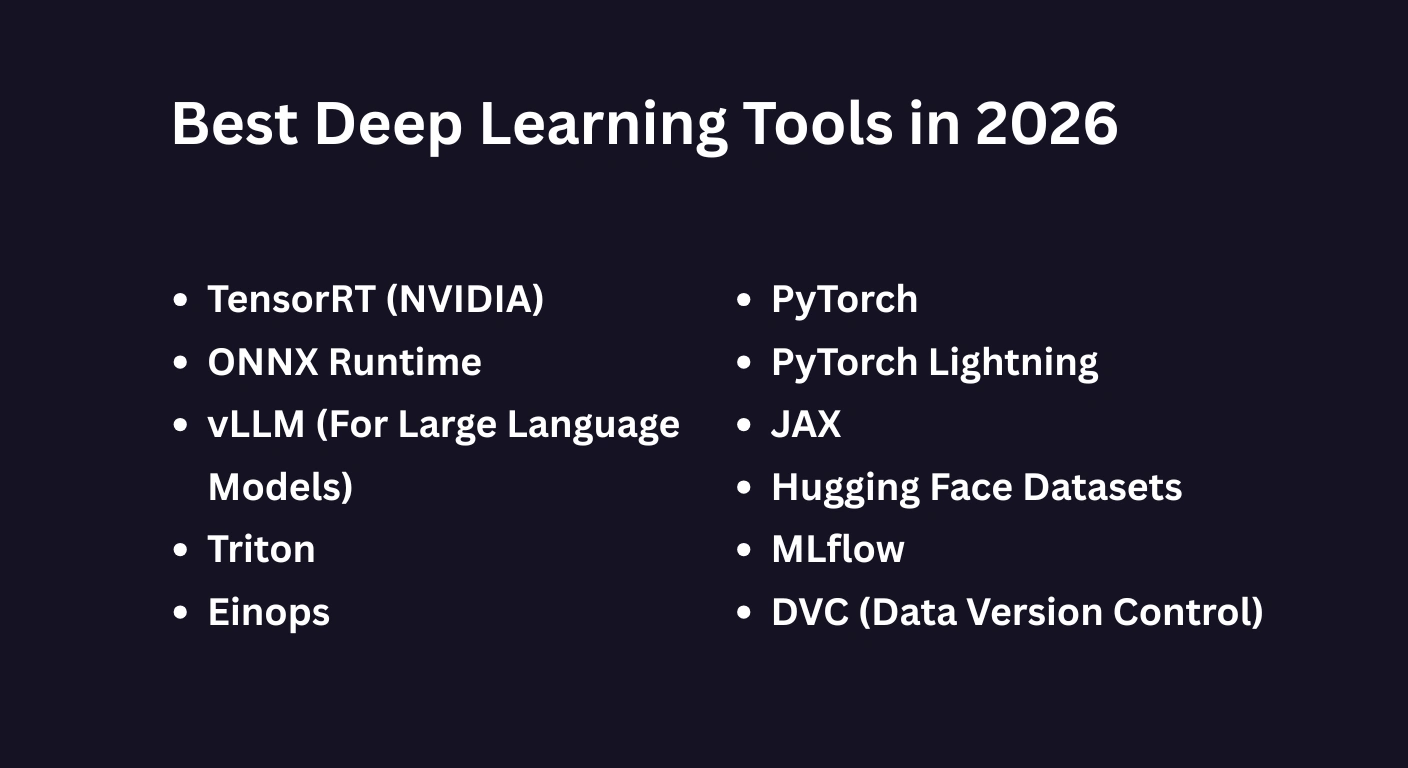
1. PyTorch (The Research Standard)
If you want to build state-of-the-art models, you need PyTorch.
According to data from Papers With Code, approximately 85% of new research papers are implemented in PyTorch.
Why is it the standard?
PyTorch uses a dynamic computational graph. This means you can modify the behavior of the network on the fly during runtime.
If you are debugging a complex Transformer architecture, this dynamic nature is non-negotiable. It allows you to inspect tensors and gradients in real-time, unlike static graph frameworks.
Learn Machine Learning with Python
Learn machine learning with Python! Master the basics, build models, and unlock the power of data to solve real-world challenges.
2. PyTorch Lightning (The Production Layer)
Raw PyTorch is powerful. But it requires you to manually write boilerplate code for training loops, validation steps, and hardware management.
That is where PyTorch Lightning comes in.
Lightning is a lightweight wrapper that sits on top of PyTorch. It organizes your code without restricting flexibility.
The Engineering Problem It Solves:
When writing raw PyTorch, you have to manually handle:
- Moving tensors from CPU to GPU (
.to(device)). - Implementing 16-bit mixed-precision training (AMP).
- Distributing training across multiple GPUs (DDP).
Lightning automates all of this. It drastically reduces engineering bugs and ensures your training loops are mathematically correct.
3. JAX (The High-Performance Rebel)
While PyTorch dominates general research, JAX is the tool of choice for high-performance computing.
Developed by Google, JAX uses XLA (Accelerated Linear Algebra) to compile your Python code into optimized machine code.
The Speed Advantage:
Unlike PyTorch, which executes code line-by-line, JAX compiles the entire function at once. This results in massive speed improvements, especially on TPUs (Tensor Processing Units) and for massive parallel processing tasks.
Note: JAX is strictly functional. You must manage model state (weights) explicitly. This creates a steeper learning curve but offers absolute control over memory.
Part 2: The Data Layer (The Silent Bottleneck)
Here is a truth that few tutorials mention:
The most common performance issue in Deep Learning is not the GPU. It is the CPU.
If your CPU cannot load and process data fast enough to feed the GPU, your expensive hardware sits idle. This is called "GPU Starvation."
Here is how you fix it.
4. Hugging Face Datasets
Do not mistake this for just an NLP library. Hugging Face datasets is a general-purpose data loading engine built on Apache Arrow.
The Engineering Problem It Solves:
Standard Python loads data into RAM. If you have a 1TB dataset and 32GB of RAM, your training script will crash.
Hugging Face Datasets uses Memory Mapping. It leaves the data on the disk and streams only the necessary batches to RAM when the GPU requests them. This allows you to train on terabytes of data using consumer-grade hardware with zero performance penalty.
5. DVC (Data Version Control)
Software engineers use Git to track code. But Git crashes if you try to push a 50GB CSV file or a folder of high-res images.
The Solution: DVC.
DVC allows you to version control your data exactly like you version control your code.
git commitsaves your code.dvc commitsaves your data.
Why This Matters:
Reproducibility. If a model you trained two weeks ago worked perfectly, but today's model is broken, you need to know exactly which version of the dataset was used. DVC links specific data versions to specific Git commits.
Also Read: Deep Learning Applications
Part 3: Experiment Tracking (The Lab Notebook)
Training a neural network involves hundreds of runs with different hyperparameters (learning rate, batch size, dropout).
If you are tracking these in a spreadsheet, you are losing valuable insights.
6. Weights & Biases (W&B)
W&B is the industry standard for tracking machine learning experiments.
It logs metrics (loss, accuracy) and system stats (GPU usage, temperature) in real-time.
The Killer Feature: Lineage
W&B tracks the full lineage of your model using Artifacts. It records:
- The exact code commit (Git SHA).
- The exact dataset version hash.
- The resulting model weight file.
If a model fails in production, you can trace the lineage back to find exactly which dataset or code change introduced the error.
7. MLflow
If your organization has strict data privacy rules and cannot send logs to a cloud server like W&B, MLflow is the best alternative.
It is open-source and can be hosted on your own servers. While it handles experiment tracking, it excels at the Model Registry - managing the lifecycle of a model from "Staging" to "Production."
Part 4: Production & Serving (Inference)
Here is the golden rule of MLOps: Never serve raw training code in production.
Training frameworks (like PyTorch) are designed for flexibility and gradients. They are heavy and slow. Serving frameworks are designed for throughput and latency.
8. ONNX Runtime
ONNX (Open Neural Network Exchange) is a universal format for AI models.
The Workflow:
- Train in PyTorch (for flexibility).
- Export to ONNX.
- Run in ONNX Runtime (for speed).
Why It Is Faster:
ONNX Runtime performs Graph Optimization. It fuses operations (combining two math steps into one) and eliminates unused nodes to reduce latency. It also allows you to run models on hardware that PyTorch might not support well, like edge devices.
9. TensorRT (NVIDIA)
If you are deploying on NVIDIA GPUs, TensorRT is the highest-performance compiler available.
It takes your model and tunes the kernels (the low-level code) to run as fast as possible on your specific GPU architecture. This often results in 2x to 5x faster inference speeds compared to raw PyTorch.
10. vLLM (For Large Language Models)
If you are serving LLMs (like Llama 3 or Mistral), standard serving tools are not enough. You need vLLM.
The Innovation: PagedAttention
LLMs consume massive amounts of GPU memory for Key-Value (KV) caches. vLLM manages this memory like an operating system manages RAM (paging).
This reduces memory fragmentation and allows the GPU to handle significantly more concurrent user requests (Throughput).
Part 5: The "Expert" Utilities
These are the tools that separate senior engineers from juniors.
11. Einops
Tensor manipulation is the most error-prone part of deep learning. Reshaping a 4D array (Batch, Height, Width, Channel) often leads to silent bugs.
Einops solves this with readable notation.
Instead of writing ambiguous code like x.view(b, h, w, c), you write:rearrange(x, 'b h w c -> b c h w')
This makes your code self-documenting and mathematically safe.
12. Triton
Sometimes, standard PyTorch layers aren't fast enough.
Triton (developed by OpenAI) allows you to write high-performance GPU kernels directly in Python. You don't need to learn C++ or CUDA. The Triton compiler converts your Python code into highly optimized machine code.
Post Graduate Program in AI & Machine Learning: Business Applications
Master in-demand AI and machine learning skills with this executive-level AI course—designed to transform professionals into strategic tech leaders.
The Bottom Line
Don't overcomplicate your stack.
Start with the essentials that solve the actual bottlenecks in your pipeline:
- Framework: PyTorch + Lightning (Structure)
- Data: Hugging Face Datasets (Memory Efficiency)
- Tracking: Weights & Biases (Debugging)
- Serving: ONNX Runtime or vLLM (Speed)
Master this stack, and you will have an engineering foundation that scales.