- Setting Up Your Python Environment for Network Automation
- Version Control with Git
- Understanding Data Serialisation Formats
- Leveraging Netmiko for Multi-Vendor SSH
- Structured Data Parsing with TextFSM
- Multi-Vendor Abstraction with NAPALM
- Scale with Nornir
- Configuration Templating with Jinja2
- Model-Driven Programmability with YANG
- Validating Network State with PyATS
- Managing Credentials and Security
- Continuous Integration/Continuous Deployment (CI/CD)
- Monitoring and Event-Driven Automation
- Conclusion
Modern networks are growing more complex, making manual configuration and troubleshooting both time-consuming and error-prone.
Network automation with Python offers a powerful solution by enabling engineers to automate repetitive tasks, manage devices at scale, and improve operational efficiency.
In this blog, we’ll explore how Python can be used for network automation, the essential libraries and tools involved, and practical steps to get started even if you’re new to automation.
Setting Up Your Python Environment for Network Automation
Success in automation starts with a clean setup. You should strictly avoid using your operating system's default Python installation. This practice frequently causes dependency conflicts that are hard to fix. Instead, you must install the latest stable version manually to ensure compatibility with modern libraries.
Once Python is installed, you need to manage your workspace effectively:
- Use Virtual Environments: Isolate your projects using the venv module. This keeps libraries for one script separate from others.
- Master pip: Use this tool to install packages specifically within your active environment.
- Set Up VS Code: Download Visual Studio Code, as it is the industry-standard editor.
Setup Commands:
# Create a new virtual environment named 'net_env'
python3 -m venv net_env

# Activate the environment (Linux/Mac)
source net_env/bin/activate

# Activate the environment (Windows)
net_env\Scripts\activate

# Install essential libraries
pip install netmiko napalm nornir nornir_utils jinja2 python-dotenv
Configure your editor to check for errors automatically. This is called linting. It keeps your code clean and ensures it follows PEP 8 standards. A proper environment prevents technical debt later in your journey.
Version Control with Git
Git allows you to revert errors and collaborate with your team safely. You should initialise a Git repository for every single project you start.
Never commit changes directly to the main branch. Create a new branch for every edit you make. This workflow allows teammates to review your code via pull requests. Peer reviews catch logic errors before they touch live equipment.
Basic Git Workflow:
# Initialize a new repository
git init

# Create and switch to a new feature branch
git checkout -b feature/update-vlan-config

# Stage your changes
git add .

# Commit with a meaningful message
git commit -m "Added VLAN 10 to core switches"
Store all your network configurations in Git as well. This concept is known as Infrastructure as Code (IaC). It acts as a single source of truth for your network state. If a device fails physically, you can rebuild its configuration instantly from the data stored in your repository.
Understanding Data Serialisation Formats
Network devices communicate using protocols, but automation scripts rely on data structures. You need to master formats that both humans and machines can read easily.
YAML is the best choice for inventory files because it is clean and easy to edit. You will use it often to list your routers and switches. JSON is the standard for APIs. Modern network operating systems often return data in this format.
Example YAML Inventory:
routers:
  - name: core-rtr-01
    ip: 192.168.1.1
    platform: cisco_ios
  - name: dist-sw-01
    ip: 192.168.1.2
    platform: arista_eos
You must learn to parse these formats into Python dictionaries. This skill allows you to filter data programmatically. You might also encounter XML on older systems. Learning to parse XML is necessary if you need to maintain compatibility with legacy infrastructure.
If you want to move beyond basic scripts and truly command the language, you should master Python programming through a structured curriculum.
In this course, you will learn the fundamentals of Python: from basic syntax to mastering data structures, loops, and functions. You will also explore OOP concepts and objects to build robust programs.
The program helps you to gain a deep understanding of Python’s logic, from data structures to object-oriented programming, ensuring that your automation workflows remain robust, scalable, and professional as your network grows.
Leveraging Netmiko for Multi-Vendor SSH
Netmiko is often the entry point for engineers starting network automation with Python. This library abstracts the complex low-level details of handling SSH connections. It simplifies the process significantly.
Netmiko offers several key advantages for beginners:
- Prompt Handling: It automatically manages router prompts like > or #.
- Timing Management: It handles slow device responses so your script does not time out unexpectedly.
- Multi-Vendor Support: It works seamlessly with Cisco, Juniper, Arista, and HP.
To use it, you create a dictionary containing the IP address, username, and password. You pass this dictionary to the connection handler.
Note: This project is not compatible with web-based compilers
Netmiko Connection Script:
from netmiko import ConnectHandler

# Define device parameters
cisco_device = {
    'device_type': 'cisco_ios',
    'host':   '192.168.1.10',
    'username': 'admin',
    'password': 'secure_password',
}

# Establish connection
net_connect = ConnectHandler(**cisco_device)

# Send a command and print output
output = net_connect.send_command('show ip int brief')
print(output)

# Always disconnect when done
net_connect.disconnect()
You should write modular scripts with reusable functions. For example, create one function specifically to log in and another to back up configurations.
Structured Data Parsing with TextFSM
A major challenge in networking is that CLI output is designed for humans. It is unstructured text. You cannot easily automate decisions based on raw text blocks. You need to convert this output into structured data tables.
TextFSM solves this problem by using template files to read raw text. You do not need to write complex regular expressions from scratch. You can leverage ntc-templates, which is a massive community library of pre-written templates.
Parsing Output with Netmiko & TextFSM:
# Netmiko has built-in support for TextFSM
# Ensure you have the ntc-templates library installed and configured

output = net_connect.send_command('show ip route', use_textfsm=True)

# The output is now a list of dictionaries, not a string
for route in output:
    if route['protocol'] == 'O': # Filter for OSPF routes
        print(f"OSPF Route: {route['network']} via {route['nexthop_ip']}")
When you combine these tools, you get structured output automatically. You can turn a show ip route command into a list of dictionaries. This allows you to script complex logic. For instance, you can verify if a route metric is correct programmatically without manually reading the screen.
Multi-Vendor Abstraction with NAPALM
Managing a network with equipment from multiple vendors is difficult. Cisco, Juniper, and Arista all use different commands for the same tasks. NAPALM provides a unified API to fix this issue.
With NAPALM, you use one function for all vendors. A command like get_interfaces() returns the exact same data structure whether you query a Cisco router or an Arista switch. You do not need to memorize specific CLI commands for every vendor. NAPALM handles the translation in the background.
NAPALM Usage:
from napalm import get_network_driver

driver = get_network_driver('ios')
device = driver('192.168.1.1', 'admin', 'password')
device.open()

# Returns a standardized dictionary regardless of vendor
interfaces = device.get_interfaces()
print(interfaces)

device.close()
NAPALM also excels at configuration management:
- Config Replace: You can replace the entire device configuration with a file.
- Config Merge: You can add specific lines to an existing configuration.
- Diff Support: You can see exactly what will change before you apply it.
Scale with Nornir
Simple loops work for small networks but fail at scale. You need concurrency to manage hundreds of devices. Nornir is a powerful framework that allows you to write a Python script for network automation capable of handling massive scale.
Unlike Ansible, Nornir uses pure Python. It does not rely on a custom language like YAML. This gives you full access to Python's debugging tools. Nornir manages an inventory of your devices and runs tasks on them in parallel.
Nornir Task Example:
from nornir import InitNornir
from nornir_netmiko.tasks import netmiko_send_command
from nornir_utils.plugins.functions import print_result

# Initialize Nornir with a config file
nr = InitNornir(config_file="config.yaml")

# Define a task function
def backup_config(task):
    task.run(task=netmiko_send_command, command_string="show run")

# Run the task against all devices in the inventory
result = nr.run(task=backup_config)

print_result(result)
You can group devices easily in your inventory. This allows you to target subsets of devices, like "all core routers," with a single command. Nornir integrates seamlessly with other tools. You can connect via Netmiko, process data with Pandas, and generate reports efficiently.
Configuration Templating with Jinja2
You should never hard-code configurations inside your scripts. This practice leads to mistakes and makes code hard to reuse. The industry standard solution is Jinja2 templating.
The workflow is simple but powerful. You create a template file that looks like a router configuration but uses variables instead of values.
Jinja2 Template (router_template.j2):
hostname {{ hostname }}
!
interface GigabitEthernet1
 description {{ interface_desc }}
 ip address {{ ip_address }} {{ subnet_mask }}
 no shutdown
You then keep your logic separate from your data. Your script feeds a dictionary of data into the template to generate the final configuration text.
Rendering Script:
from jinja2 import Environment, FileSystemLoader

env = Environment(loader=FileSystemLoader('.'))
template = env.get_template('router_template.j2')

data = {
    'hostname': 'NYC-R1',
    'interface_desc': 'Uplink to Core',
    'ip_address': '10.0.0.1',
    'subnet_mask': '255.255.255.0'
}

print(template.render(data))
You can also use logic inside the template. Jinja2 supports if statements and for loops. This ensures every device receives a standard configuration. It eliminates configuration drift where devices slowly become different over time.
Model-Driven Programmability with YANG
CLI scraping can be brittle if a vendor changes their output format. Model-driven programmability is the modern standard for reliability. It uses YANG models to define exactly how data should look.
You interact with these models using the NETCONF protocol and libraries like ncclient. This approach is transactional. The device validates the entire configuration before applying it. If any part of the data is invalid, the device rejects the whole transaction.
NETCONF with ncclient:
from ncclient import manager

with manager.connect(host='192.168.1.1', port=830, username='admin', password='password', hostkey_verify=False) as m:
    # Get configuration using NETCONF
    config = m.get_config(source='running')
    print(config.data_xml)
This prevents partial configurations that can break connectivity. You can also validate your data against the model locally before sending it. This helps you catch syntax errors early in the development process.
Validating Network State with PyATS
Automation is not just about pushing changes. You must also verify that your changes worked as intended. PyATS is a comprehensive testing framework built specifically for this purpose.
You can create automated test cases for your network:
- Snapshot State: Take a snapshot of the network routing table before a change.
- Compare Results: Take a second snapshot after the change and compare them.
- Genie Library: Use the Genie library to parse operational data into Python objects.
This allows you to find missing routes or disconnected interfaces instantly. You can run these tests periodically to detect silent failures like packet loss. This transforms troubleshooting from a reactive panic into a proactive process.
Managing Credentials and Security
Security is critical when doing network automation using Python. You must protect your access details at all costs. Never type usernames or passwords directly into your script files.
Store secrets in your operating system's environment variables. You can then read them securely using Python's os module. For local testing, use .env files and the python-dotenv library.
Secure Credential Handling: Python
import os
from dotenv import load_dotenv

# Load variables from .env file
load_dotenv()

username = os.getenv("DEVICE_USERNAME")
password = os.getenv("DEVICE_PASSWORD")

# Now use these variables in your connection logic
You must ensure that your Git configuration ignores these files so they are not uploaded to the repository.
Adhere to the principle of least privilege. Create specific service accounts on your routers for automation tasks. Give the script only the permissions it needs to do the job. Do not provide full administrative rights if the script only needs to read interface counters.
Continuous Integration/Continuous Deployment (CI/CD)
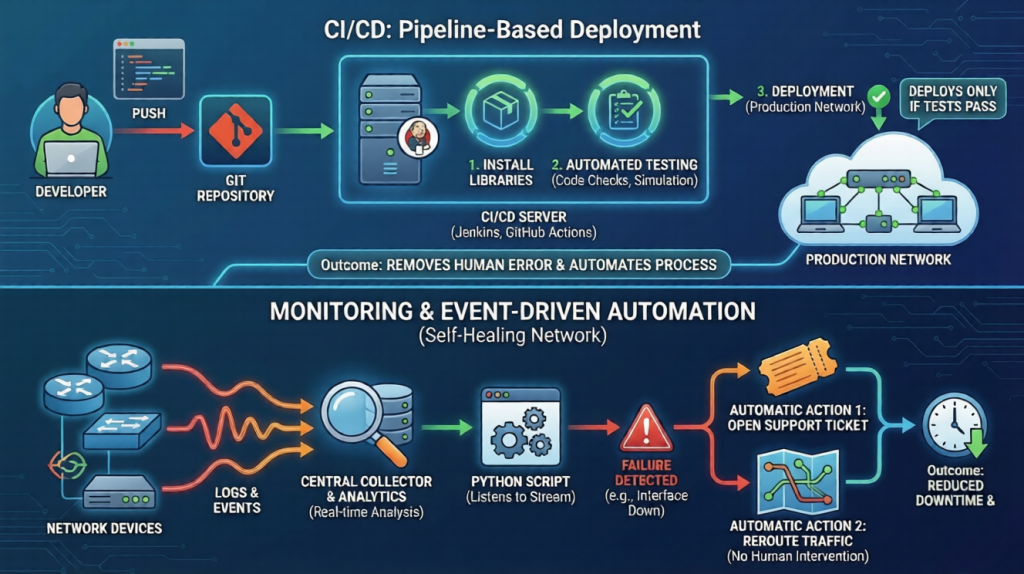
The most mature automation teams use CI/CD pipelines. This moves execution from your laptop to a central server. You trigger the process simply by pushing code to your Git repository. The pipeline runs on servers like Jenkins or GitHub Actions. It installs your libraries and checks your code for errors automatically.
It can even deploy your changes to a simulation environment first. The pipeline deploys to the production network only if all tests pass. This removes human error from the deployment process.
Monitoring and Event-Driven Automation
The next step is making the network heal itself. You can connect your scripts to live network events. Configure your devices to send logs to a central collector.
Your Python application can listen to this stream and analyse patterns in real time. If an interface fails, the system can trigger a script automatically. This script could open a support ticket or reroute traffic without human intervention. This approach reduces downtime significantly and fixes problems faster than a human operator can react.
Conclusion
Network automation using Python is a powerful skill that changes how you manage infrastructure. It is a journey that starts with simple backup scripts and evolves into complex orchestration.
You should start small and focus on consistency. Use Git for version control and Jinja2 for templating from day one. Prioritize security by managing your credentials carefully. By mastering tools like Netmiko, Nornir, and PyATS, you will build a network that is reliable, scalable, and efficient.
Mastering network automation is a major milestone, but the secret to success is focusing on the fundamentals first. If you try to jump straight into complex automation tasks without knowing the basics, it can feel like trying to read a book in a language you haven't learned yet. To build your skills the right way, join our Free Python Course. It’s the easiest way for total beginners to go from zero experience to a confident coder, giving you the exact roadmap you need to master Python and beyond.
Python Fundamentals for Beginners Free Course
Master Python basics, from variables to data structures and control flow. Solve real-time problems and build practical skills using Jupyter Notebook.