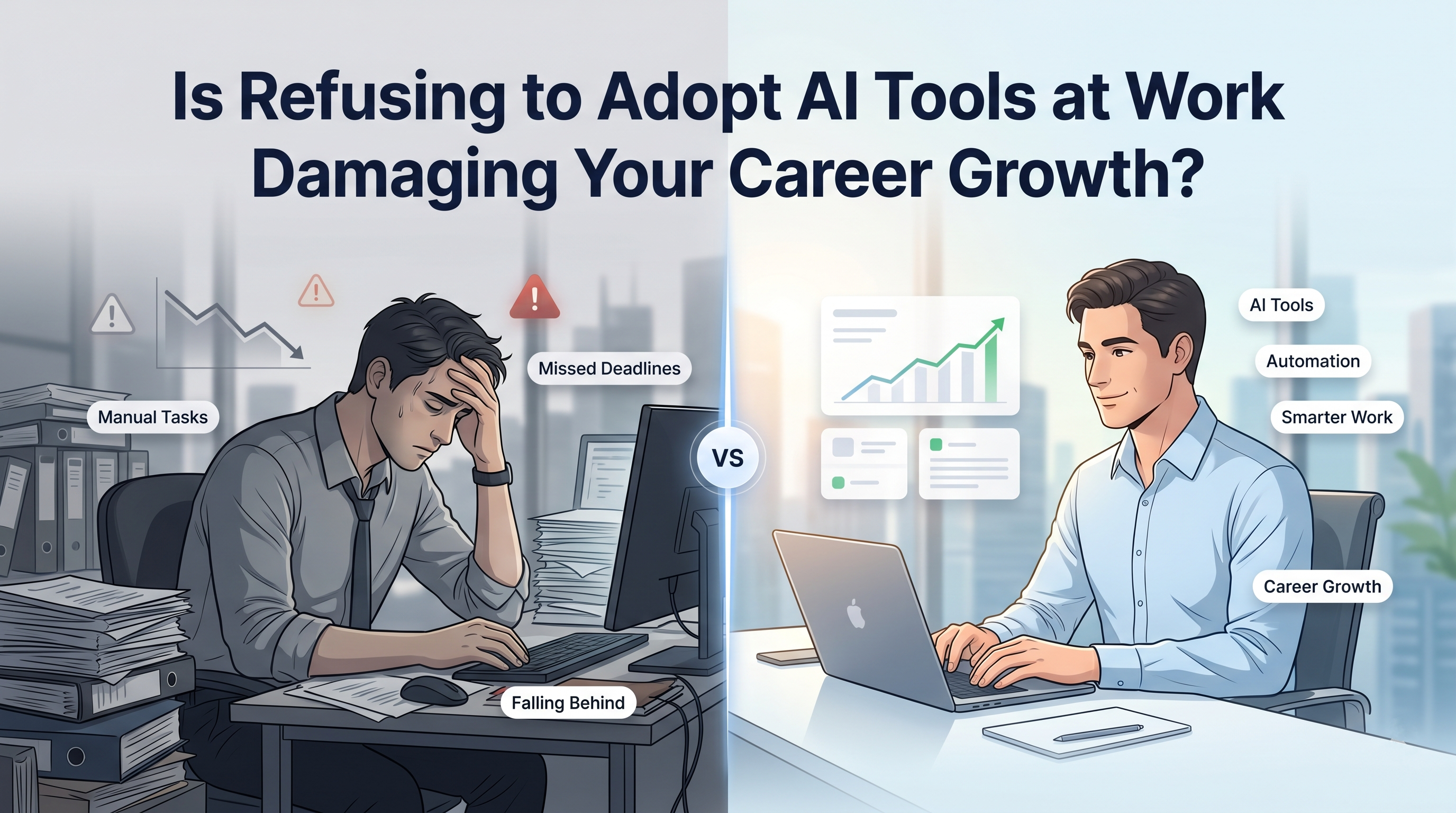
The conversation around automation has shifted from whether AI algorithms will supersede human workers to how professionals who integrate these systems will outpace those who resist. If you have been asking whether AI will replace jobs, the reality is most likely yes.
Data indicates that 69% of professionals believe their jobs are being impacted by technology, especially AI. However, this disruption brings substantial opportunity, with 78% of workers feeling positive about the potential impact of AI on their careers.
Professionals leveraging AI, large language models (LLMs), and predictive analytics are upskilling to integrate automation into their workflows to succeed in the long run.
Understanding how Careers & Jobs in Artificial Intelligence (AI) are evolving is critical for anyone aiming to safeguard their livelihood. Refusing to adopt these cognitive tools is no longer a neutral stance; it is an active deceleration of your career growth.
Key Impacts on Career Growth in 2026
The professional cost of AI non-adoption is no longer theoretical. Executives surveyed across industries have been unequivocal: ignoring AI is a bigger career threat than AI itself. The impact manifests across four critical dimensions.
1. Passed Over for Promotions
Promotion decisions today increasingly reflect an employee's ability to leverage emerging technologies to drive outcomes. Managers are beginning to view AI fluency or the lack of it as a proxy for adaptability and strategic thinking.
Employees who rely solely on manual processes are often perceived as working harder, not smarter. In performance evaluations, those who demonstrate AI-augmented productivity are more likely to be flagged as high-potential contributors.
According to the Great Learning Upskilling Trends Report,15% of professionals cite promotions as a primary motivation for upskilling, a figure that underscores how directly the two are linked in professional perception.
2. Job Insecurity
Non-adoption of AI does not merely slow career growth; it can accelerate job displacement. Industry research shows that executives are increasingly factoring AI readiness into workforce decisions.
Employees who cannot demonstrate proficiency with AI tools are at a distinct disadvantage during restructuring exercises or role redefinitions. The World Economic Forum's Future of Jobs Report projects that approximately 92 million jobs will be displaced by technological advancements by 2030, many of which involve routine cognitive tasks now being automated.
Professionals who delay upskilling are directly in the path of this disruption. For those navigating a career transition, resources like How an AI Course Can Help You Pivot After a Layoff offer structured guidance on repositioning oneself in an AI-driven market.
3. Stagnation vs. Productivity
The productivity gap between AI-enabled professionals and those operating without AI assistance is widening rapidly.
Tasks that previously required hours, such as drafting reports, synthesizing data, and creating presentations, are now being completed in minutes by professionals proficient in generative AI (GenAI) tools.
As per the Upskilling Trend Report, 60% of professionals already use GenAI always or frequently in their work, and 80% use it to learn new skills. Those who opt out of this shift are not maintaining a baseline; they are falling behind.
Okay, but how do I start using AI in my daily work?
The challenge is that most professionals don’t fall behind because they reject AI outright. They fall behind because they never move beyond occasional experimentation. Using ChatGPT once in a while is different from building AI into how you research, communicate, analyze information, and execute work every day.
Professionals who consistently outperform their peers are increasingly treating AI as part of their operating system rather than a standalone tool. The AI-Native Professional program is designed to help working professionals make that shift. Through hands-on projects, participants learn how to build AI-powered workflows, create practical agents, and integrate leading AI tools into real workplace processes, turning AI from a curiosity into a measurable productivity advantage.
If you are unsure what the AI currently demands, this video is a useful starting point: 6 Steps to Get Started with AI for Beginners.
4. Weak Competitive Positioning
In a job market where 43% of professionals cite high competition as a major challenge, the differentiator between comparable candidates is increasingly AI competency. Hiring managers are not just looking for domain expertise; they are looking for professionals who can amplify it with AI.
Candidates without demonstrable AI skills are entering a fundamentally uneven competitive environment. To get started, you can explore what employers expect beyond basic knowledge in this insightful read: What Employers Expect Beyond Basic AI Tool Usage.
To counteract this stagnation, consider comprehensive upskilling pathways such as the PG Program in Artificial Intelligence & Machine Learning.
PG Program in AI & Machine Learning
Master AI with hands-on projects, expert mentorship, and a prestigious certificate from UT Austin and Great Lakes Executive Learning.
This program is delivered in collaboration with leading academic institutions and covers core domains including Machine Learning, Natural Language Processing, and Computer Vision. Designed for deep skill building, it offers a structured curriculum that bridges the gap between theoretical algorithms and strategic business applications, equipping you to securely navigate technological disruptions.
AI Adoption Is Not Just for Tech Roles
A common misconception is that AI fluency is a prerequisite only for software engineers, data scientists, or machine learning specialists.
This is a dangerous oversimplification. AI is a cross-functional productivity layer; it is as relevant to a marketing manager as it is to a cloud architect. Here’s how:
- Marketing: Generative AI tools are transforming content strategy, SEO, and audience segmentation. Marketers who leverage large language models (LLMs) for content generation, predictive analytics for campaign performance, and AI-assisted A/B testing are consistently outperforming peers relying on traditional methods.
- HR: Human resources professionals are deploying AI for intelligent candidate screening, sentiment analysis of employee feedback, and workforce demand forecasting. AI-assisted hiring workflows reduce time-to-hire and improve candidate quality. Professionals interested in understanding this shift further can explore Career Options in AI for cross-domain perspectives.
- Finance: From AI-driven revenue forecasting to automated anomaly detection in financial statements, finance professionals are using machine learning models to add predictive intelligence to their analysis. Manual forecasting is being replaced by AI-augmented decision support systems.
- Operations: AI-powered workflow automation tools are enabling operations managers to identify bottlenecks, predict supply chain disruptions, and optimize resource allocation in real time. Those who understand how to design and manage these automated workflows command a measurable strategic advantage.
If you are wondering what AI careers look like across these domains, watch: Careers & Jobs in Artificial Intelligence (AI).
Must-Have AI Skills to Stay Relevant
The following are the core capabilities that professionals must develop to remain competitive. These are not buzzwords; they are operational skills now required across roles and industries.
1. Prompt Engineering
Prompt engineering is the way of structuring inputs to large language models (LLMs) to generate accurate, contextually relevant, and actionable outputs. It is the foundational skill of the AI era.
- Writing clear, context-rich, goal-oriented prompts that minimize hallucinations and maximize precision
- Using zero-shot, few-shot, and chain-of-thought prompting techniques, depending on task complexity
- Iterating on outputs through structured feedback loops to refine AI-generated content progressively
- Understanding token limits, temperature settings, and how model parameters influence output behavior
2. AI-Assisted Decision Making
This skill involves embedding AI-generated insights into strategic and operational decision-making processes.
- Using predictive analytics dashboards to interpret AI-generated forecasts and recommendations
- Identifying which decisions benefit from AI augmentation versus those requiring purely human judgment
- Structuring decision frameworks that integrate real-time AI outputs with institutional knowledge and contextual understanding
3. Workflow Automation Designing
The ability to design automated workflows with AI-native and AI-integrated tools is among the most in-demand skills across functions in 2026.
- Mapping repetitive, rule-based tasks that are viable candidates for robotic process automation (RPA) and AI automation
- Using tools like Zapier, Make (formerly Integromat), and Microsoft Power Automate to build intelligent pipelines
- Designing end-to-end automated workflows that connect data ingestion, AI processing, and output delivery without manual intervention
- Documenting and iterating on automation logic to ensure reliability, transparency, and auditability
For a deeper understanding of the most sought-after competencies in this space, visit: Most In-Demand Skills in Artificial Intelligence.
4. Output Validation and Critical Thinking
Adopting AI tools does not mean surrendering judgment. The ability to evaluate, verify, and improve AI outputs is itself a high-value professional skill.
- Cross-referencing AI-generated data points with primary sources to ensure factual accuracy
- Recognizing and correcting hallucinations, instances where AI models produce confident but incorrect outputs
- Applying domain expertise to contextualize and refine AI-generated recommendations before acting on them
- Combining AI processing speed with human intuition and ethical reasoning to produce outputs that are both efficient and defensible
5. Tool Stacking
The most productive AI-enabled professionals do not rely on a single tool; they architect intelligent workflows by combining multiple AI systems.
- ChatGPT / Claude: Ideation, first-draft generation, research synthesis
- Google Sheets / Excel AI / Copilot: Data analysis, pattern recognition, formula automation
- Automation platforms (Zapier, Make): Connecting outputs across tools without manual intervention
- Building these stacks into repeatable, scalable workflows that colleagues can adopt without needing technical expertise
Tools like ChatGPT, GitHub Copilot, Microsoft Copilot, Notion AI, and Google Gemini are now part of everyday workflows across industries. Learners interested in mastering intelligent workflow automation can further strengthen their practical skills through this Microsoft Copilot Course.
Learn to create agentic workflows, automate repetitive tasks, and build AI-powered solutions with this Microsoft Copilot Course designed for real-world business productivity.
Understand the evolving difference between generative and agentic AI and what it means for your skill set: GenAI vs Agentic AI: Key Skills Powering the Future of Work.
6. Domain + AI Integration
The most enduring form of AI fluency is domain-specific, the ability to apply AI within the context of one's professional expertise.
- Marketing: Using AI for programmatic ad targeting, generative content pipelines, and customer sentiment modeling
- HR: Building AI-assisted hiring workflows that score resumes, schedule interviews, and generate onboarding documentation
- Finance: Deploying machine learning models for time-series forecasting, risk scoring, and variance analysis
For early-career professionals building these integrated skills,How Early-Career Professionals Build AI-Ready Skills is an essential reference.
To solidify these technical competencies, the Master's Artificial Intelligence program provides a comprehensive foundation. Offering 18 coding exercises and 3 hands-on projects, this course covers critical terminologies and architectures across machine learning, neural networks, computer vision, and Generative AI, culminating in an industry-recognized career certificate.
AI for Everyone: Learn AI Essentials
Learn how AI for Everyone makes artificial intelligence accessible to all. Learn how AI can enhance your life, work, and creativity, regardless of technical skills.
Step-by-Step How to Start Using AI
Example: Using AI for a Weekly Business Report
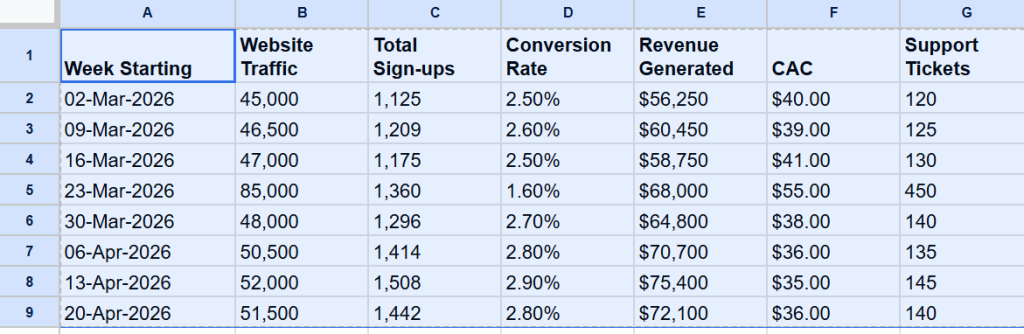
Scenario: You are responsible for a weekly performance report. Traditionally, this task consumes 3 - 4 hours: gathering data from multiple systems, performing manual analysis, writing a narrative summary, and formatting the final document. Here is how you execute it with AI in a fraction of the time.
Step 1: Prepare and Input the Raw Data
Before the AI can assist, it needs context. In this step, you are establishing the foundation for your report by feeding the AI your consolidated metrics. Highlight the data table you just pasted into Google Sheets to provide the AI with context.
Step 2: Prompt for Analytical Insights
Instead of manually calculating week-over-week variances, you will instruct the AI to act as your data analyst. The goal here is to uncover the "why" behind the numbers.
- Open the AI assistant (like the Gemini side panel) and input a highly specific, context-rich prompt asking for data interpretation.
- The Prompt: "Analyze this weekly performance data. Highlight the overarching statistical trends over the 8 weeks, identify any major data anomalies or irregularities, and provide 3 actionable, data-driven business insights based on your findings."
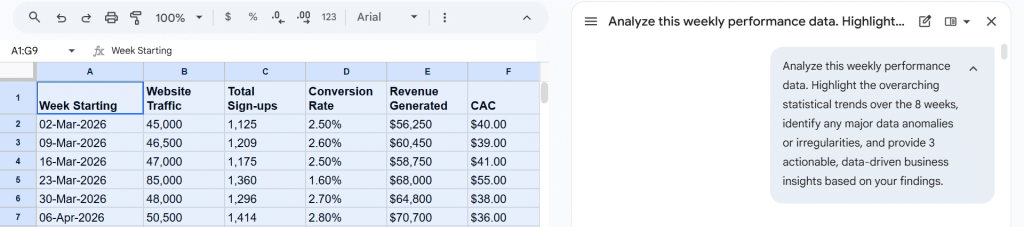
Result: Gemini processes the data and intelligently recognizes that the best way to "highlight trends" is visually.
It instantly generates a series of clear charts in the side panel: a line chart showing a massive spike in Website Traffic on March 23rd.
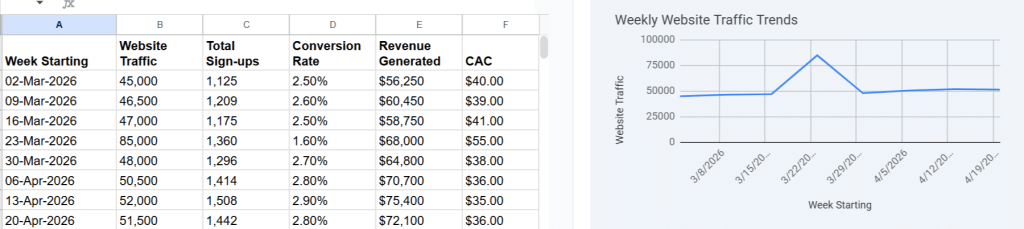
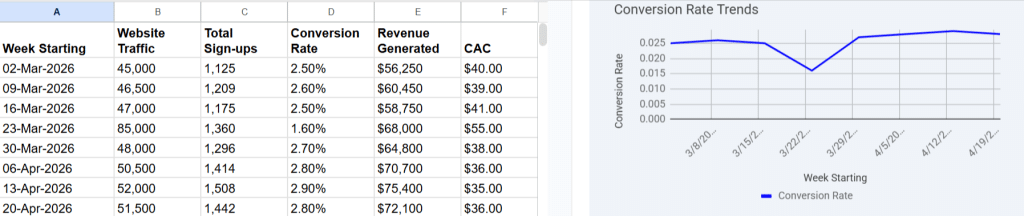
A corresponding line chart shows a severe drop in Conversion Rates that same week.
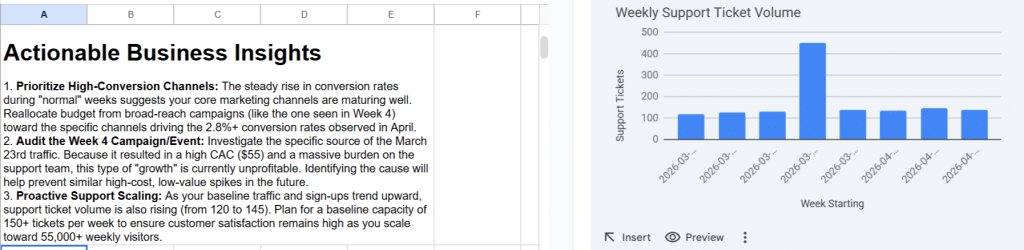
A bar chart highlighting a massive surge in Support Tickets and 3 actionable items you should consider to start doing.
Step 3: Review the AI’s Trend & Anomaly Detection
The AI has done the heavy lifting of spotting the irregularities. Now you review its findings.
- Visually validate the anomaly using the generated charts. Confirm that the massive traffic spike on March 23rd was low-quality, as it directly correlates with poor conversions and a high support burden.
- You bypass reading a wall of text and instantly grasp the business problem visually. You can now use the "Insert" button in the Gemini panel to drop these ready-made visualizations directly into your spreadsheet or presentation deck.
Step 4: Generate the Executive Report
Now that the AI has analyzed the data, you need to format it for your stakeholders. This step transitions the AI from a "data analyst" to a "business writer."
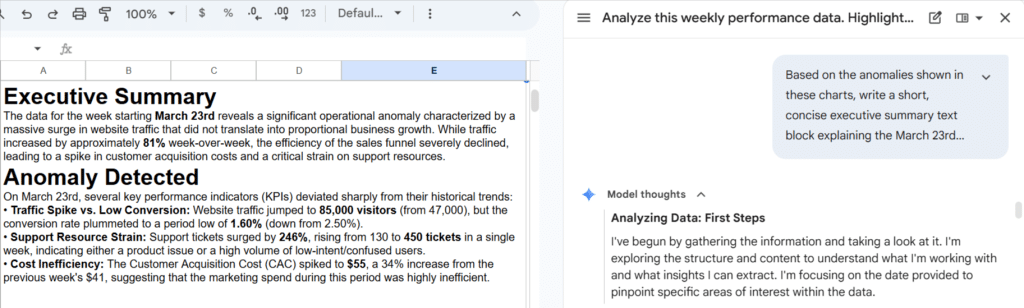
- Give the AI a secondary prompt to structure its previous analysis into a readable corporate format. "Based on the anomalies shown in these charts, write a short, concise executive summary text block explaining the March 23rd incident. Use clear headings: Executive Summary, Anomaly Detected, and Strategic Recommendations."
- Result: The AI shifts from visual generation to text generation. It produces a formatted text block detailing the inverse relationship between the March 23rd traffic spike and the conversion/support metrics, perfectly complementing your new charts.
Step 5: Refine and Polish the Output
The first draft is rarely the final draft. This final step showcases the collaborative nature of working with AI, where human judgment steers the final product.
- Ask the AI to adjust the tone, expand on a specific recommendation, or rewrite a section for clarity. For example- "Make the tone more authoritative. Ensure the 'Strategic Recommendations' specifically address how we should handle future traffic spikes to prevent the high Customer Acquisition Cost and support ticket volume seen on March 23rd." The final output transforms into a polished executive brief.
This is the operational reality of AI-enabled productivity, and it is accessible to any professional willing to invest in the relevant skills. For hands-on practice and structured exercises to build these capabilities, explore:
Your Next Step
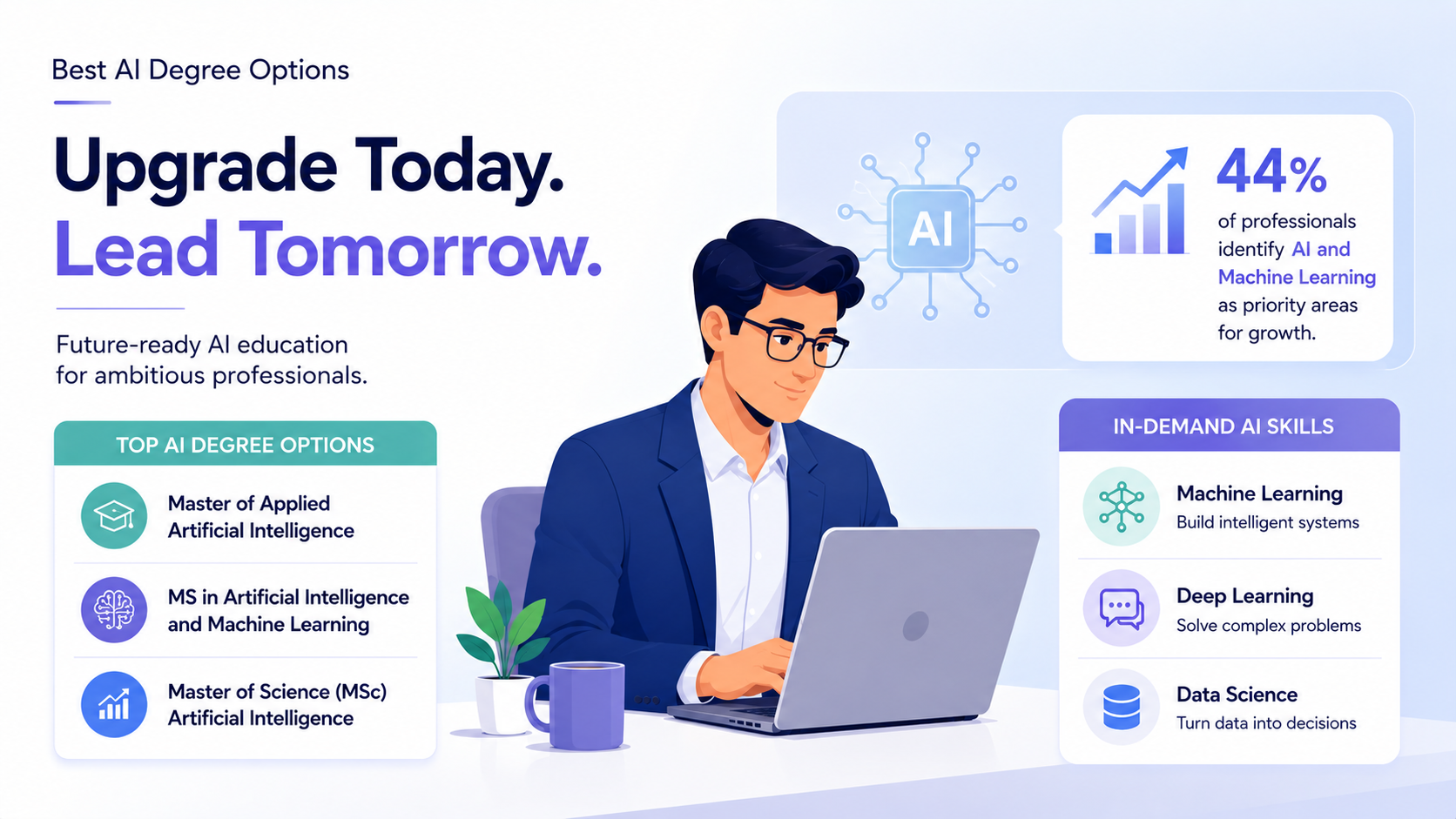
85% of professionals believe upskilling is essential to future-proof their careers. Machine Learning and AI are the top domains of choice for upskilling, selected by 44% of professionals. The question is no longer whether to develop AI skills, but how to do so efficiently and effectively.
The following structured pathways are available to professionals at different stages of readiness:
- For navigating the signal from the noise: With so many AI tools and trends competing for attention, What to Learn vs. What's Hype as AI Becomes Mainstream is an essential read for professionals making deliberate upskilling decisions.
- For foundational learning: The Free Course: Career in Artificial Intelligence on Great Learning Academy provides a zero-barrier entry point to understanding AI fundamentals, career pathways, and skill requirements, ideal for professionals exploring the domain before committing to a longer program. You can also watch: 5 Key Skills to Kickstart Your Career in Artificial Intelligence.
- For career-oriented AI learning: Explore How to Start a Career in AI and Machine Learning and the detailed AI and ML Job Trends analysis to understand exactly where the market is heading and what roles are emerging. You can also read How AI Will Create More Jobs for a balanced perspective on the future of work.
- For comprehensive, credential-backed learning: The JHU Certificate Program in Applied Generative AI and Agentic AI, in collaboration with Johns Hopkins University, offers a rigorous, application-focused curriculum covering prompt engineering, LLM integration, and enterprise AI deployment, backed by one of the world's most respected academic institutions.
Certificate Program in Applied Generative AI
Master the tools and techniques behind generative AI with expert-led, project-based training from Johns Hopkins University.
The competitive divide in the modern workforce is not between those with and without advanced degrees; it is between those who have integrated AI into their professional practice and those who have not.
Refusing to adopt AI tools at work is not a neutral decision. It is a decision to fall behind in a landscape that rewards adaptability above all else. The career you build from this point forward will be shaped, in no small part, by how seriously you take that reality. Start exploring your Career Roadmap in AI and use the AI Knowledge Quizzes to assess where you stand today.