
What if AI could review a dashboard, update a spreadsheet, or complete tasks across software applications instead of only suggesting what to do?
OpenAI's newly launched GPT-6.1 Terra brings this shift into focus, with improvements in visual reasoning, computer use, coding, and factual accuracy.
For students, developers, and working professionals, the bigger opportunity lies in learning how to use these capabilities responsibly. Here are five practical AI skills worth developing before 2027, and where they fit into real work.
TL;DR: GPT-6.1 Terra highlights a shift from AI-generated answers to AI-assisted action. Before 2027, focus on five skills: computer use, visual reasoning, AI agents, AI-assisted coding, and output evaluation. Start with the skill most relevant to your work.
What Makes GPT-6.1 Terra Different from GPT-6.1 Sol?
GPT-6.1 Sol and GPT-6.1 Terra serve different needs. GPT-6.1 Sol is designed for complex coding, computer use, and professional tasks, offering near-GPT-6 Astra performance at a lower cost.
GPT-6.1 Terra, meanwhile, focuses on fast, efficient visual reasoning, precise computer use, and clear, natural writing. Its standard API prices are 50% lower than those of GPT-6.1 Sol, making it suitable for high-volume, cost-sensitive workflows.
GPT-6.1 Terra also delivers improved coding performance compared with its predecessor. According to OpenAI, it achieved a 50.3% task success rate on Terminal-Bench 4.0 at maximum reasoning effort, compared with GPT-5.6 Terra’s published score of 21.5%.
However, OpenAI recommends GPT-6.1 Sol or GPT-6 Astra for the most complex coding tasks. These benchmark results indicate performance under specific testing conditions, not guaranteed results for every project.
The key takeaway is that choosing an AI model is only part of the equation. Professionals also need skills in automation, tool integration, and output evaluation to turn model capabilities into reliable, practical solutions.
5 AI Skills to Learn Before 2027
1. AI-Powered Computer Use
Computer-use AI enables models to interact with supported software interfaces and perform actions such as clicking buttons, entering information, navigating menus, and editing documents.
For example, a professional could use an AI-powered workflow to collect information from several records, update a spreadsheet, and prepare a report. A developer could use it to navigate an application and complete repetitive testing steps.
To develop this skill, learn how to break a task into clear instructions, identify the steps that can be automated, and define what successful completion looks like. Understand application permissions, sensitive-data handling, and checkpoints for human approval.
What to learn: Desktop automation, task decomposition, application permissions, and error recovery.
2. Multimodal AI and Visual Reasoning
Multimodal AI works with more than one type of input, including text and images. Visual reasoning helps AI interpret the relationships between elements in an image rather than simply describe what appears in it.
Consider a business analyst examining a dashboard. Instead of manually reviewing every chart, the analyst could ask AI to identify unusual patterns, compare displayed metrics, and summarize potential concerns.
Similarly, developers could use visual inputs to investigate interface issues, while designers could review layouts for inconsistencies.
However, AI-generated interpretations still require validation. A chart may contain ambiguous labels, and a screenshot may omit important context.
What to learn: Image prompting, chart interpretation, visual comparisons, and validating AI-generated observations against original data.
3. AI Agent Development and Workflow Automation
AI agents combine language models with tools, external information, and defined workflows to complete multistep tasks. Instead of generating a single response, an agent can use tools, inspect results, and continue toward a specified objective.
For example, a research agent could collect information from approved sources, organize findings, prepare a summary, and submit it for human review. A customer-support agent could classify incoming requests and retrieve relevant information before suggesting a response.
Building reliable agents requires an understanding of APIs, tool calling, workflow orchestration, permissions, and failure handling.
Professionals looking for structured learning in business applications can explore the AI Agents for business automation from Texas McCombs in collaboration with Great Learning. The program covers generative AI, retrieval-augmented generation (RAG), agentic workflows, and multi-agent systems.
UT Austin PG Program in AI Agents & Generative AI
Master GenAI, large language models, and multi-agent systems to automate business workflows. Learn to build and deploy intelligent AI agents with no coding background.
What to learn: Python or JavaScript, APIs, tool calling, workflow orchestration, and agent evaluation.
4. AI-Assisted Coding and Debugging
AI-assisted coding can help developers generate code, understand unfamiliar functions, locate errors, create tests, and investigate software issues. Its value lies in accelerating development while leaving technical decisions and verification to the developer.
For example, a developer troubleshooting a web application could ask AI to explain an error, identify likely causes, suggest a targeted fix, and generate test cases. The developer can then run the tests, review the changes, and check whether the fix introduces new problems.
To use these tools effectively, build a foundation in programming, data structures, debugging, version control, and software testing. You should also learn to provide relevant code context and evaluate generated solutions instead of accepting them automatically.
What to learn: Python or JavaScript, Git, debugging, automated testing, and AI-assisted code review.
5. AI Evaluation and Output Verification
As AI systems take on more complex tasks, knowing how to measure their reliability becomes essential. A workflow that appears successful may still produce incorrect data, skip steps, or generate an inaccurate final answer.
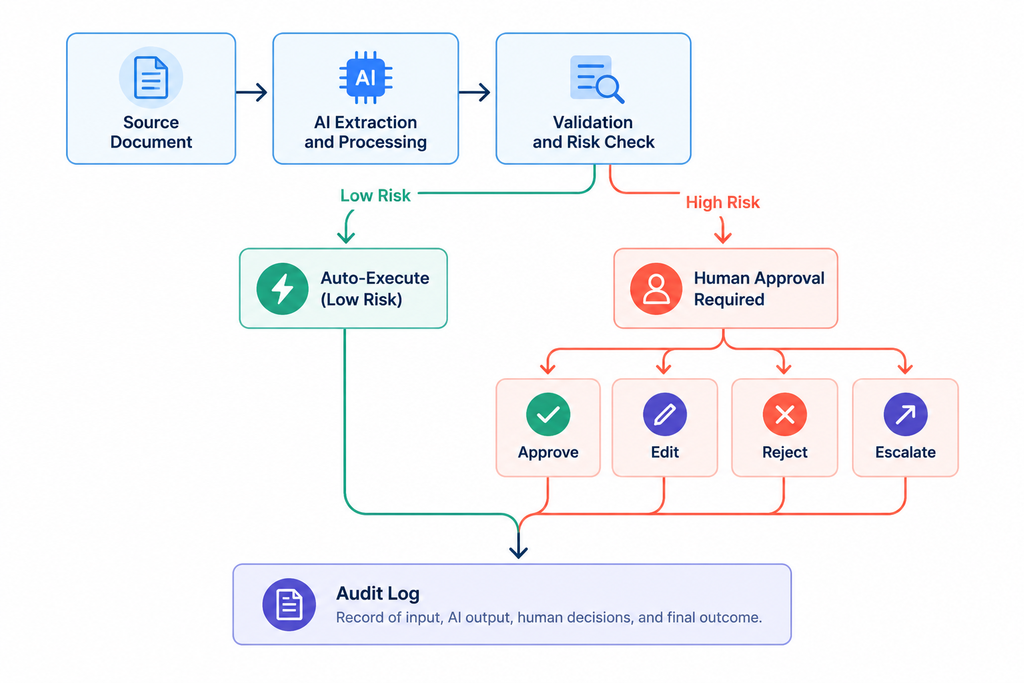
Suppose an AI system extracts invoice details and enters them into accounting software. Completing the form is not enough. The extracted amounts, dates, supplier names, and tax calculations must also be checked.
AI evaluation involves defining expected results, testing different inputs, measuring errors, and reviewing failures. For AI agents, it also includes checking whether the correct tools were used and whether the task was completed within the required boundaries.
Even as GPT-6.1 Terra improves factual accuracy in OpenAI's evaluations, lower error rates do not eliminate the need to check outputs in real business workflows.
This skill is especially important when automation affects financial records, customer information, software deployments, or business decisions.
What to learn: Test cases, factual verification, task-completion metrics, failure analysis, and human-in-the-loop review.
How to Start Learning These Skills Before 2027
You do not need to master all five areas at once. Choose one practical problem and build a small project around it.
- Choose a repetitive task: Pick something measurable, such as organizing spreadsheet data, reviewing a set of documents, or testing a web page.
- Build a basic AI workflow: Use a suitable AI tool and, where necessary, an API to perform selected steps.
- Test the results: Compare the output against expected results, document errors, and improve the workflow.
- Expand gradually: Add visual inputs, additional tools, or approval checkpoints only when they solve a real problem.
A small, working project with documented results demonstrates practical ability better than a collection of disconnected AI experiments.
Working professionals who want guided practice with prompts, AI workflows, and agents can also enroll in Great Learning’s AI Agents course. This six-week online program focuses on applying AI tools and building practical workflows to automate repetitive work.
AI-Native Professional: Workflows & Agents for Productivity
Transition from basic AI usage to building automated, multi-step workflows and deploying AI agents. Perfect for functional professionals with no coding background.
Final Thoughts
GPT-6.1 Terra highlights how AI is advancing in visual reasoning, computer use, and coding. However, turning these capabilities into useful results requires more than access to a powerful model.
By learning AI automation, agent development, coding, and output evaluation, you can build practical solutions and use AI more reliably. Start with one hands-on project and expand your skills as you learn.
If you are new to AI agents, Great Learning's free Building Intelligent AI Agents course introduces agent fundamentals, CrewAI, LangGraph, and workflow design. It provides a starting point for understanding how AI agents work before you move on to more advanced projects.
Frequently Asked Questions
1. What is GPT-6.1 Terra?
GPT-6.1 Terra is an AI model designed to support tasks involving visual reasoning, computer use, coding, and writing, helping users work with information and software applications.
2. What are the five AI skills to learn before 2027?
The five skills are AI-powered computer use, multimodal AI, AI agent development, AI-assisted coding, and AI evaluation. These capabilities support practical automation and reliable AI workflows.
3. Is prompt engineering still worth learning in 2027?
Yes. Clear instructions, relevant context, and structured outputs remain valuable for directing AI systems. However, prompt engineering works best alongside technical knowledge and output verification.
4. Do I need coding skills to work with AI agents?
Not always. No-code platforms can help beginners create basic workflows, but Python, JavaScript, and API knowledge are valuable for building and debugging more sophisticated AI agents.
5. How can I start learning AI automation?
Start by selecting a repetitive task, building a small AI-assisted workflow, and testing its results. Gradually introduce APIs, additional tools, and human-review checkpoints as needed.
6. How is computer-use AI different from traditional automation?
Traditional automation typically follows predefined rules and workflows. Computer-use AI uses models to interpret software interfaces and perform actions based on instructions. This allows greater flexibility across changing interfaces, but requires safeguards, permissions, and output verification.
7. Which AI skill should nontechnical professionals learn first?
Start with AI-powered computer use or workflow automation. These skills help you identify repetitive tasks, create structured workflows, and evaluate AI-generated results without requiring advanced programming knowledge. Coding becomes more useful when you need custom integrations or complex agents.