Building a Library Management System in SQL is one of the most practical ways to understand how databases work in real-world scenarios. Building a Library Management System in SQL is one of the most practical ways to understand how databases work in real-world scenarios.
To get started, a quick tutorial is a great place to start, but real progress comes from structured, hands-on learning, and the Practical SQL Training course from Great Learning is the best option.
Master SQL and Database management with this SQL course: Practical training with guided projects, AI support, and expert instructors.
The course teaches core SQL commands, database design, and advanced analytics. By the end, you will be able to build complex databases and real-world reporting systems from scratch.
However, if you just need to get your database up and running today, the following is a complete step-by-step guide to building your foundational tables and high-performance queries. We are going to build them from scratch using a sample dataset, starting with the most important part: the final output.
Primary Goal: Developing Reports Using Joined Data Tables
In database design, you must prioritize your most important outputs first. Library staff rely on daily reports to track overdue items, manage inventory, and identify active members. You generate these insights using SQL JOINs to connect member profiles with book checkout histories and return logs.
- Track Inventory: Link the Books and Issued_Status tables to monitor availability.
- Overdue Alerts: Filter records based on return dates, due dates, and the current date.
- Member Activity: Group borrowing histories to see who reads the most.
If you want to learn more about Joins in SQL, the Free SQL Joins Course for Beginners is a great place to start.
Required Free Tools and Platforms
You do not need expensive software or heavy local installations to start building. Several browser-based tools, such as Great Learning’s SQL compiler, allow you to practice immediately by running and checking the code without any hassle.
Step-by-Step Implementation Guide
Step 1: Design the Database Schema
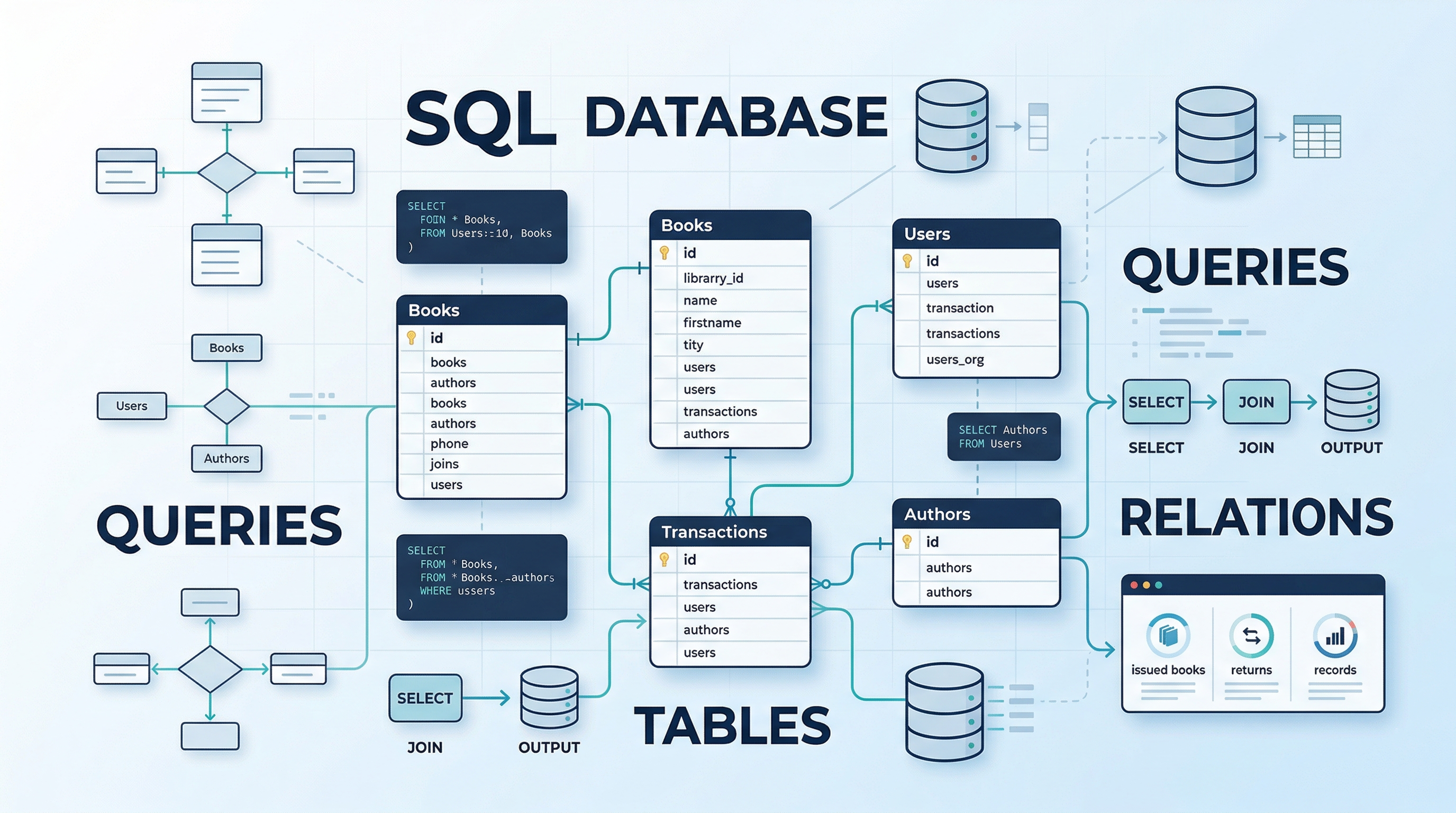
Start by defining your core tables: Books, Members, Employees, Issued_Status, and Return_Status. Visualizing how these categories relate to one another prevents critical structural errors later on. Grasping this structural integrity is a major milestone when designing a database for a library management system in SQL.
If you prefer learning by watching, check out this excellent Library Database Management System using SQL live session by Great Learning. It walks you through core database concepts, environment setup, and writing your first queries, making it the perfect companion video.
Step 2: Define Keys and Constraints
Your database needs strict rules to maintain total accuracy. You must assign Keys (Primary and Foreign) to link tables together logically. Applying Constraints (like NOT NULL) prevents users from entering blank or invalid records, ensuring every issued book has a proper issue date and due date.
Run the following SQL script to build your foundational structure:
-- First, drop existing tables in the correct order to avoid Foreign Key errors

DROP TABLE IF EXISTS Return_Status;

DROP TABLE IF EXISTS Issued_Status;

DROP TABLE IF EXISTS Employees;

DROP TABLE IF EXISTS Members;

DROP TABLE IF EXISTS Books;

-- 1. Create Books Table

CREATE TABLE Books (

    isbn VARCHAR(20) PRIMARY KEY,

    title VARCHAR(100) NOT NULL,

    category VARCHAR(50),

    rental_price DECIMAL(10,2),

    status VARCHAR(10) DEFAULT 'yes'

);

-- 2. Create Members Table

CREATE TABLE Members (

    member_id VARCHAR(10) PRIMARY KEY,

    member_name VARCHAR(100) NOT NULL,

    reg_date DATE

);

-- 3. Create Employees Table

CREATE TABLE Employees (

    emp_id VARCHAR(10) PRIMARY KEY,

    emp_name VARCHAR(100),

    position VARCHAR(50)

);

-- 4. Create Issued_Status Table (Tracks when books are checked out)

CREATE TABLE Issued_Status (

    issued_id VARCHAR(10) PRIMARY KEY,

    issued_member_id VARCHAR(10),

    issued_book_isbn VARCHAR(20),

    issued_emp_id VARCHAR(10),

    issue_date DATE NOT NULL,

    due_date DATE NOT NULL,

    CONSTRAINT fk_member FOREIGN KEY (issued_member_id) REFERENCES Members(member_id),

    CONSTRAINT fk_book FOREIGN KEY (issued_book_isbn) REFERENCES Books(isbn),

    CONSTRAINT fk_emp FOREIGN KEY (issued_emp_id) REFERENCES Employees(emp_id)

);

-- 5. Create Return_Status Table (Tracks when books are brought back)

CREATE TABLE Return_Status (

    return_id VARCHAR(10) PRIMARY KEY,

    issued_id VARCHAR(10),

    return_date DATE NOT NULL,

    CONSTRAINT fk_issued FOREIGN KEY (issued_id) REFERENCES Issued_Status(issued_id)

);
Output
Step 3: Insert Sample Data
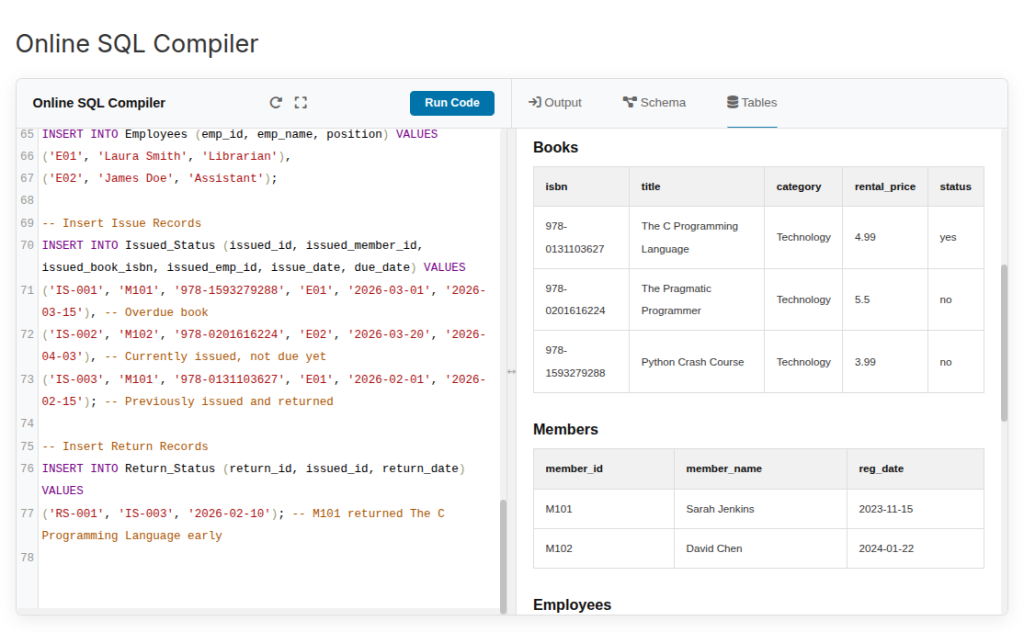
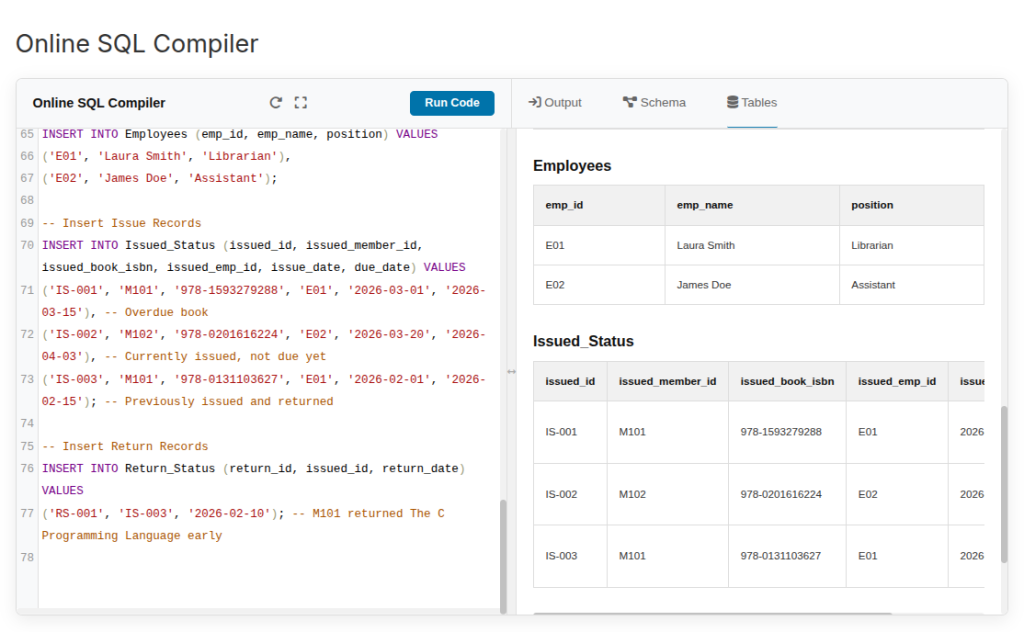
An empty database is impossible to test. You need to add realistic dummy data to see how your system responds to commands. Working with active data helps you test and visualize your library database management system using SQL because you can see the outputs instantly.
Copy and paste these sample INSERT statements to populate your new tables:
-- Insert Books

INSERT INTO Books (isbn, title, category, rental_price, status) VALUES

('978-0131103627', 'The C Programming Language', 'Technology', 4.99, 'yes'),

('978-0201616224', 'The Pragmatic Programmer', 'Technology', 5.50, 'no'),

('978-1593279288', 'Python Crash Course', 'Technology', 3.99, 'no');

-- Insert Members

INSERT INTO Members (member_id, member_name, reg_date) VALUES

('M101', 'Sarah Jenkins', '2023-11-15'),

('M102', 'David Chen', '2024-01-22');

-- Insert Employees

INSERT INTO Employees (emp_id, emp_name, position) VALUES

('E01', 'Laura Smith', 'Librarian'),

('E02', 'James Doe', 'Assistant');

-- Insert Issue Records

INSERT INTO Issued_Status (issued_id, issued_member_id, issued_book_isbn, issued_emp_id, issue_date, due_date) VALUES

('IS-001', 'M101', '978-1593279288', 'E01', '2026-03-01', '2026-03-15'), -- Overdue book

('IS-002', 'M102', '978-0201616224', 'E02', '2026-03-20', '2026-04-03'), -- Currently issued, not due yet

('IS-003', 'M101', '978-0131103627', 'E01', '2026-02-01', '2026-02-15'); -- Previously issued and returned

-- Insert Return Records

INSERT INTO Return_Status (return_id, issued_id, return_date) VALUES

('RS-001', 'IS-003', '2026-02-10'); -- M101 returned The C Programming Language early
Output
Output
Step 4: Execute High-Performance Queries
Once your data is in place, you can build out the functional code to achieve our initial goals. Always specify exactly which columns you need rather than relying on the wildcard asterisk (*). Reducing the amount of data the system processes is a core rule for writing better SQL queries.
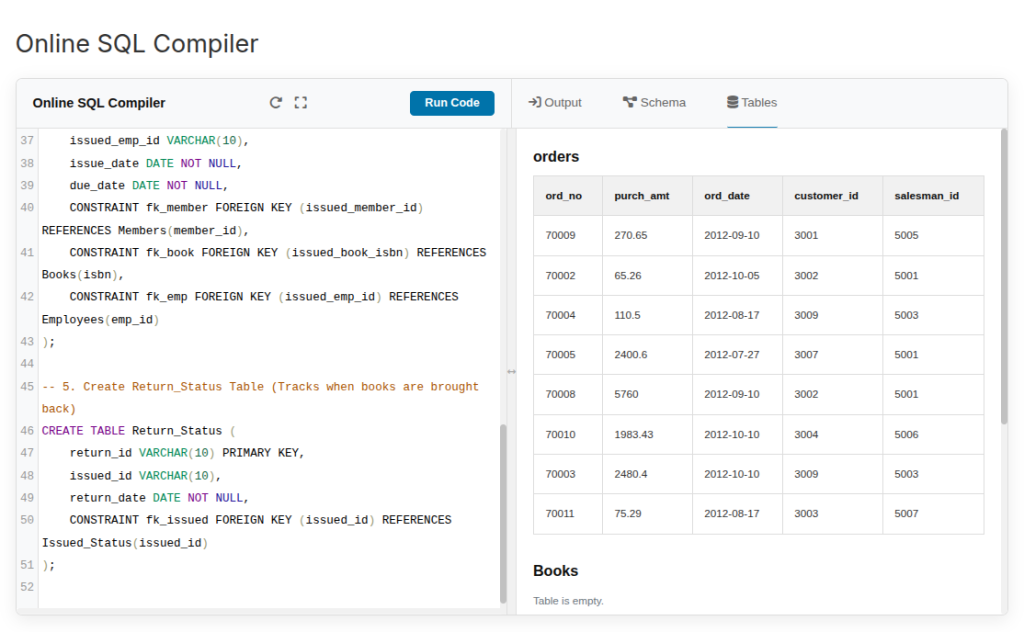
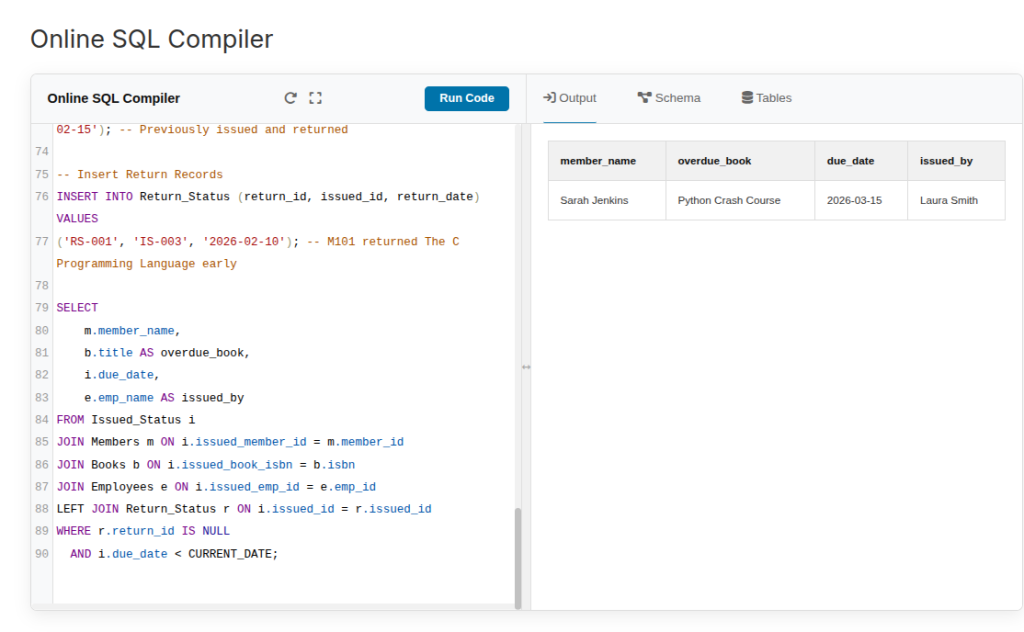
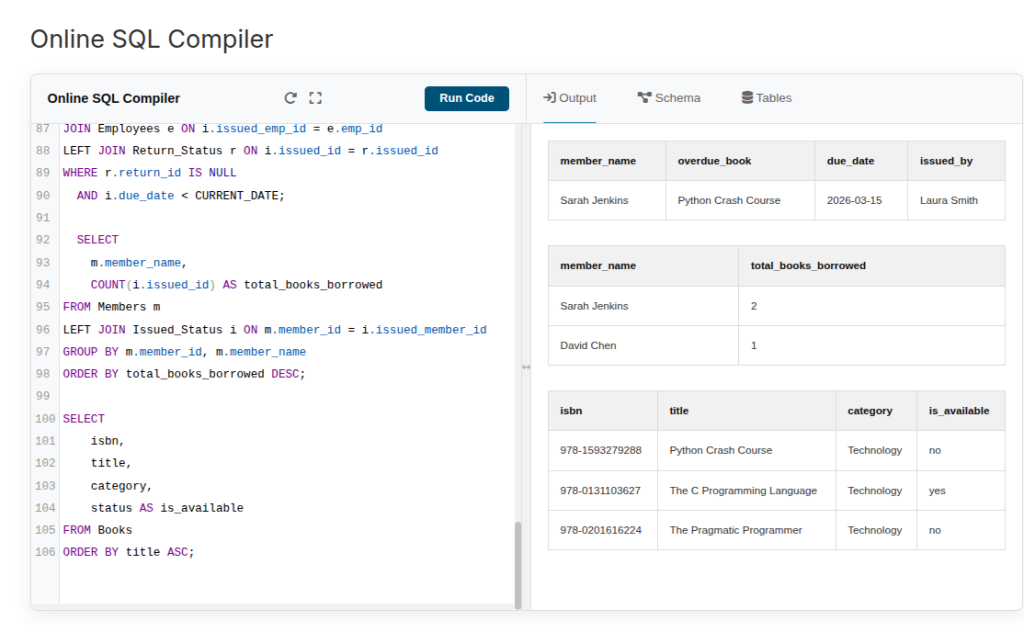
1. Overdue Alerts This query finds books where the due date has passed, and there is no matching record in the Return_Status table (meaning the book is still out).
SELECT

    m.member_name,

    b.title AS overdue_book,

    i.due_date,

    e.emp_name AS issued_by

FROM Issued_Status i

JOIN Members m ON i.issued_member_id = m.member_id

JOIN Books b ON i.issued_book_isbn = b.isbn

JOIN Employees e ON i.issued_emp_id = e.emp_id

LEFT JOIN Return_Status r ON i.issued_id = r.issued_id

WHERE r.return_id IS NULL

  AND i.due_date < CURRENT_DATE;
Output
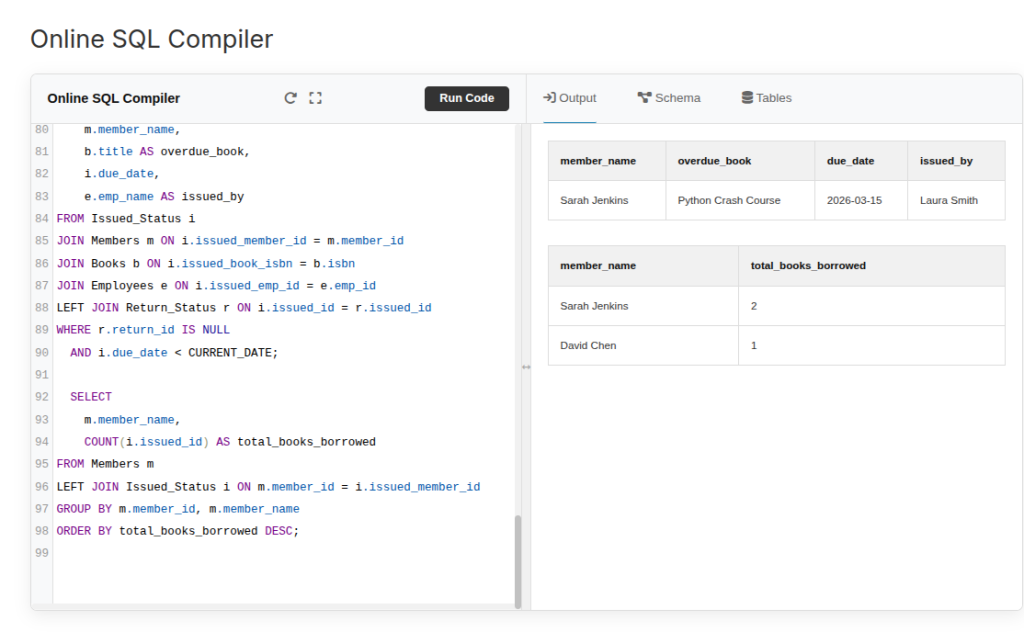
2. Member Activity (Top Readers) This query groups borrowing histories to see who utilizes the library the most.
SELECT

    m.member_name,

    COUNT(i.issued_id) AS total_books_borrowed

FROM Members m

LEFT JOIN Issued_Status i ON m.member_id = i.issued_member_id

GROUP BY m.member_id, m.member_name

ORDER BY total_books_borrowed DESC;
Output
3. Track Inventory Availability: Check the current status of all books in the system.
SELECT

    isbn,

    title,

    category,

    status AS is_available

FROM Books

ORDER BY title ASC;
Output
Conclusion
Building an LMS from scratch teaches you the core mechanics of relational databases. By starting with your end reports in mind, like tracking overdue books with date functions, you ensure your tables and relationships serve a highly functional purpose. Keep experimenting with different constraints and joins to master your database management skills.