
- What Are OpenAI Dots?
- What Is GPT-6.1 Sol?
- OpenAI Dots vs GPT-6.1 Sol: What Is the Difference?
- How Do Dots and GPT-6.1 Sol Approach AI Agents Differently?
- What Happens When an AI Agent Uses GPT-6.1 Sol?
- Why Does GPT-6.1 Sol Matter for AI Agent Development?
- Where Do Dots Make More Sense Than Building Your Own Agent?
- Where Does GPT-6.1 Sol Make More Sense?
- How Capable Is GPT-6.1 Sol for Agentic Workflows?
- What Does This Mean for the Future of AI Agents?
- What Are the Risks of Always-On AI Agents?
- Dots vs GPT-6.1 Sol: Which One Should You Use?
- Final Thoughts
- Frequently Asked Questions
OpenAI'slatest AI releases signal a shift from conversational AI toward systems that can reason, use tools, operate software, and work toward goals with less step-by-step supervision.
Two announcements from OpenAI's September 2026 DevDay make this shift particularly clear: Dots, a new category of always-on AI agents, and GPT-6.1 Sol, a lower-cost model designed for complex coding, computer use, and professional workflows.
At first glance, comparing OpenAI Dots vs GPT-6.1 Sol might seem straightforward. Both are designed around more capable AI agents and autonomous workflows. But they operate at different layers of the AI stack.
Dots is an agent experience. GPT-6.1 Sol is a model.
Understanding that distinction helps explain where AI agents are heading—and why the next generation of AI systems will be less about generating an answer and more about taking action to accomplish a goal.
What Are OpenAI Dots?
OpenAI Dots are persistent, always-on AI agents designed to work toward user goals 24/7. Unlike a traditional chatbot that primarily responds to individual prompts, Dots are designed to continue working on tasks and projects after the initial instruction, making them better suited to ongoing, multi-step work.
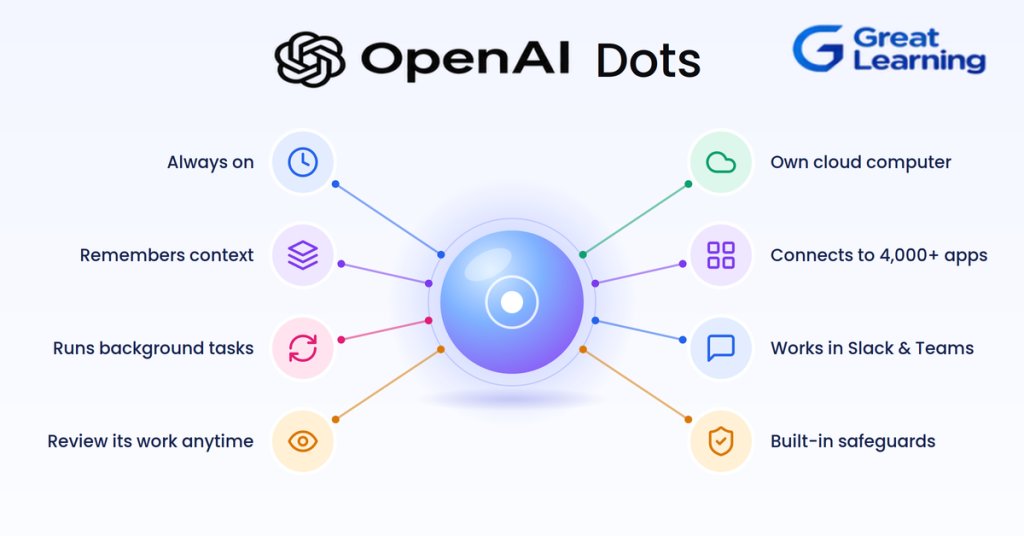
Each Dot has its own cloud computer, allowing it to interact with digital environments and work across connected applications. OpenAI also says Dots can learn from user feedback over time, helping them adapt their work to a user's preferences and requirements.
Dots can connect to more than 4,000 applications through OpenAI's plugin ecosystem. This gives them access to the tools and services needed to carry out tasks rather than simply generating a response in a chat window.
For example, instead of asking an AI to create a one-time research summary, a user could give a Dot an ongoing objective such as tracking a project, gathering information from multiple applications, and organizing the results.
The Dot can continue working toward that objective 24/7, reducing the need for users to repeatedly provide instructions or manually coordinate each step.
Dots are available through ChatGPT and can also be accessed through workplace platforms such as Slack and Microsoft Teams, allowing them to operate within the tools where users already work.
For example, instead of asking an AI to summarize several project documents, a user could give a Dot a broader objective such as:
"Prepare the weekly product update and identify anything that needs my attention."
The agent can potentially gather information, work across connected applications, organize findings, and return a completed result.
The important innovation is therefore not simply better text generation. It is persistent task execution.
What Is GPT-6.1 Sol?
GPT-6.1 Sol is a new model in OpenAI's GPT-6 family designed to provide near-Astra performance for complex work at substantially lower cost. OpenAI positions it specifically for coding, computer use, and professional workflows.
Its API pricing is:
| Metric | GPT-6.1 Sol |
| Input | $2 / 1M tokens |
| Cached input | $0.10 / 1M tokens |
| Output | $10 / 1M tokens |
| Context window | 1.05M tokens |
| Maximum output | 128K tokens |
| Reasoning effort | Low, Medium, High, XHigh, Max |
OpenAI reports that GPT-6.1 Sol can approach GPT-6 Astra's performance on several demanding workloads while costing substantially less.
For example, OpenAI says it matches Astra on DeepSWE v1.1 at roughly one-fifth the cost and comes within 2.1 percentage points of Astra on the tested OSWorld 2.0 computer-use setting at maximum reasoning effort.
That makes Sol particularly interesting for developers building high-volume AI agents, where model quality matters but inference economics can determine whether an agent is practical to run continuously.
OpenAI Dots vs GPT-6.1 Sol: What Is the Difference?
The biggest difference is where each technology sits in the AI stack.
| Feature | OpenAI Dots | GPT-6.1 Sol |
| What it is | AI agent/product | AI model |
| Primary purpose | Perform ongoing work for users | Power complex AI workloads |
| Always-on behavior | Yes | Depends on the application |
| Cloud computer | Yes | Supports computer-use tools |
| Tool use | Built into the agent experience | Available through API tools |
| App integrations | 4,000+ apps through ecosystem | Developers integrate tools themselves |
| Persistent goal-oriented work | Core feature | Can enable it when used in an agent |
| Coding | Can use coding capabilities/tools | Strong coding focus |
| Computer use | Agent capability | Native tool support |
| Custom development | More managed | Highly developer-oriented |
| Best suited for | Users and organizations wanting managed agents | Developers building AI applications and agents |
The simplest way to think about the relationship is:
Dots = the agent that performs the work
GPT-6.1 Sol = the intelligence developers can use to build systems that perform the work
There is therefore some overlap in capabilities, but they are not substitutes in the traditional sense.
How Do Dots and GPT-6.1 Sol Approach AI Agents Differently?
The difference becomes clearer when looking at the workflow.
Dots: Goal First
Dots is designed around a user's objective.
The user can provide a goal, preferences, and feedback. The agent can then work across connected tools and continue making progress.
For example:
Goal → Research → Gather information → Work across apps → Organize results → Return outcome
This is closer to delegating work to a digital employee.
OpenAI describes Dots as agents that can work toward goals 24/7 and learn from feedback over time.
GPT-6.1 Sol: Capability First
GPT-6.1 Sol is designed for developers who want to build these kinds of workflows.
A developer can combine Sol with:
- Web search
- File search
- Computer use
- Code interpreter
- Hosted shell
- MCP
- Tool search
- External APIs
- Internal business systems
The OpenAI API documentation lists these tools as supported capabilities for GPT-6.1 Sol.
This means a development team could construct its own agent architecture rather than relying on a preconfigured agent experience.
What Happens When an AI Agent Uses GPT-6.1 Sol?
Consider an enterprise software company building an AI support agent.
A conventional LLM might answer:
Customer: "Why was my order delayed?"
Model: "Your order appears to have been delayed because of a shipping issue."
An agentic system can do considerably more:
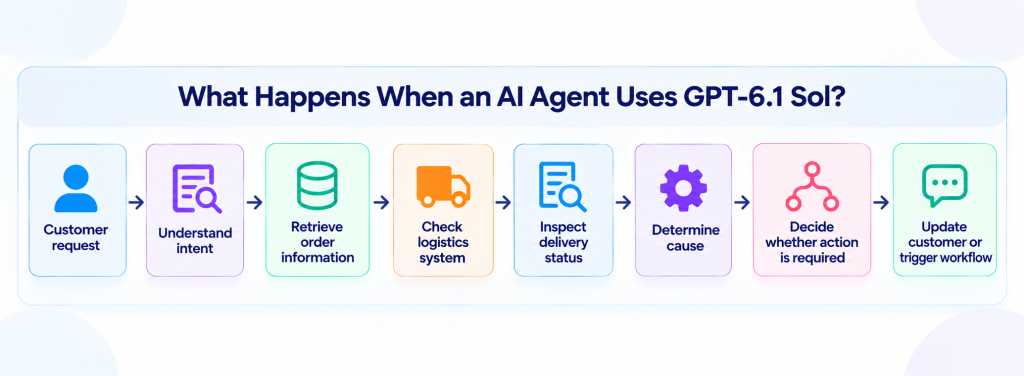
GPT-6.1 Sol can provide the reasoning and tool-use capability inside this architecture, while the surrounding application controls permissions, tools, state, business rules, and user experience.
This distinction is critical.
The model does not become the entire agent by itself.
An AI agent is usually a system consisting of a model plus tools, instructions, state, permissions, orchestration, evaluation, and application logic.
As AI agent development evolves, technologies such as RAG, MCP, LangGraph, CrewAI, and multi-agent systems are becoming important building blocks.
Professionals looking to develop practical expertise can explore the Agentic AI course by IIT Bombay, which offers hands-on learning and live sessions from IIT Bombay faculty.
IIT Bombay Certificate in Agentic AI
Master Agentic AI with IIT Bombay. Build dynamic, autonomous agentic systems and master multi-agent orchestration using LangGraph and CrewAI.
Why Does GPT-6.1 Sol Matter for AI Agent Development?
One of the biggest barriers to deploying AI agents at scale is cost.
An agent may make multiple model calls while completing a single task:
User request → Planning → Retrieval → Tool call → Analysis → Tool call → Verification → Final response
If each step uses an expensive model, costs can increase quickly.
OpenAI positions GPT-6.1 Sol as a way to obtain near-Astra-level performance for many complex workloads at substantially lower token prices.
Its standard pricing is $2 per million input tokens and $10 per million output tokens, compared with $10 and $50 respectively for GPT-6 Astra.
That creates an important opportunity for developers:
More capable agent → More tasks per workflow → Lower model cost → Greater economic viability
The model's large 1.05-million-token context window also provides room for long documents, codebases, multi-step workflows, and substantial contextual information.
Building an AI agent that can reason, retrieve information, use tools, and execute multi-step tasks requires more than selecting a capable model.
Developers also need skills in RAG, multi-agent systems, evaluation, security, and deployment. The AI Agents course by Johns Hopkins University offers hands-on projects, JHU faculty sessions, and industry mentorship across these areas.
Certificate Program in Agentic AI
Learn the architecture of intelligent agentic systems. Build agents that perceive, plan, learn, and act using Python-based projects and cutting-edge agentic architectures.
Where Do Dots Make More Sense Than Building Your Own Agent?
Dots are particularly relevant when the goal is to delegate work rather than build an AI product.
They can make sense for:
- Project research
- Workplace coordination
- Repetitive administrative work
- Information gathering
- Cross-application workflows
- Ongoing project assistance
- Personal productivity
- Team workflows
A business user does not necessarily need to design an orchestration layer, manage model routing, or build tool integrations from scratch.
Instead, the managed agent handles much of the underlying complexity.
This is similar to the difference between using a finished software application and building one with an API.
Where Does GPT-6.1 Sol Make More Sense?
GPT-6.1 Sol becomes more attractive when an organization wants to build its own AI system.
For example:
- Customer-service agents
- Coding agents
- Research agents
- Internal enterprise assistants
- AI-powered software products
- Document-processing systems
- Financial workflow agents
- Healthcare workflow applications
- Autonomous testing systems
- Computer-use agents
Developers can control the surrounding architecture and determine exactly which tools an agent can access and which actions require approval.
This is particularly important in enterprise environments where organizations need control over:
Data → Permissions → Tools → Policies → Evaluation → Monitoring → Human approval
How Capable Is GPT-6.1 Sol for Agentic Workflows?
OpenAI's published evaluations show improvements across several areas.
On DeepSWE v1.1, which evaluates complex software-engineering tasks in real codebases, OpenAI reports that GPT-6.1 Sol matches GPT-6 Astra while using roughly one-fifth of the cost.
On AutomationBench, which evaluates multi-step business workflows involving 47 tools, GPT-6.1 Sol scores 2.2 percentage points above Opus 5.5 at medium reasoning effort and 4.8 percentage points above GPT-6 Sol under the same setting, according to OpenAI's testing.
For computer use, OpenAI reports that Sol improves substantially over GPT-6 Sol on OSWorld 2.0 and comes relatively close to Astra on the tested maximum-reasoning setting.
These results should be interpreted as benchmark results rather than guarantees of performance in every production environment. Real-world agent performance also depends on tool quality, orchestration, prompts, data, permissions, and evaluation.
What Does This Mean for the Future of AI Agents?
The significance of Dots and GPT-6.1 Sol goes beyond two individual products.
They represent two sides of the same transition.
AI is moving from answer generation toward task completion.
Earlier AI systems were primarily judged by questions such as:
- How accurate is the answer?
- How fluent is the response?
- How well does the model follow instructions?
Agentic systems introduce another set of questions:
- Can the system use tools correctly?
- Can it complete a multi-step task?
- Can it recover from errors?
- Can it remember relevant context?
- Can it operate software?
- Can it respect permissions?
- Can its actions be evaluated?
- Can humans intervene when necessary?
This changes the definition of AI capability.
A better model is no longer automatically the best system.
The best system may be the one that can reliably complete a valuable task at an acceptable cost and within clearly defined boundaries.
What Are the Risks of Always-On AI Agents?
Greater autonomy also creates greater risk.
If an agent can access email, documents, business systems, browsers, or other applications, mistakes can have real consequences.
Potential risks include:
- Unauthorized actions
- Incorrect decisions
- Data exposure
- Prompt injection
- Excessive permissions
- Hallucinated information
- Accidental changes to business data
- Poorly understood agent goals
- Cascading errors across multiple tools
OpenAI says Dots follow permission controls and provide mechanisms for users to regulate what they can do. GPT-6.1 Sol also includes safety improvements for agentic tasks, including evaluations around unauthorized outcomes and respecting task boundaries.
This suggests that agent governance will become as important as model intelligence.
Organizations deploying agents will need clear policies for:
What can the agent see? → What can it change? → What requires approval? → What gets logged? → How is failure detected?
Dots vs GPT-6.1 Sol: Which One Should You Use?
The answer depends on what you are trying to accomplish.
| If you want to... | Better fit |
| Delegate ongoing work to an AI | Dots |
| Build a custom AI agent | GPT-6.1 Sol |
| Automate internal workflows | GPT-6.1 Sol |
| Use a managed AI assistant | Dots |
| Build an AI-powered product | GPT-6.1 Sol |
| Work across connected workplace apps | Dots |
| Control your own tools and architecture | GPT-6.1 Sol |
| Experiment with agentic application development | GPT-6.1 Sol |
| Delegate personal or team tasks | Dots |
The important point is that you do not necessarily have to choose between them.
A future AI workflow could involve Dots at the user-facing layer and powerful models underneath, while developers can use GPT-6.1 Sol to build specialized agents for workflows that require more control.
Final Thoughts
OpenAI Dots vs GPT-6.1 Sol is ultimately not a simple model-versus-model comparison.
Dots represents a move toward persistent, always-on AI agents that can take responsibility for ongoing work.
GPT-6.1 Sol represents the model layer that developers can use to build sophisticated AI applications involving coding, computer use, reasoning, and multi-step workflows.
Together, they point toward a broader change in how people interact with software.
The next generation of AI may not simply wait for a prompt, generate an answer, and stop. Instead, AI systems will increasingly be expected to understand a goal, plan a sequence of actions, use tools, evaluate progress, and deliver an outcome.
That is the real shift behind the new era of AI agents: moving from AI that answers questions to AI that helps complete the work.
Frequently Asked Questions
1. What is the difference between OpenAI Dots and GPT-6.1 Sol?
OpenAI Dots is an AI agent experience designed to work toward user goals over time, while GPT-6.1 Sol is an AI model that developers can use to build applications and agentic workflows. In simple terms, Dots is the agent experience, while GPT-6.1 Sol provides model intelligence for developers building their own systems.
2. Is GPT-6.1 Sol an AI agent?
No. GPT-6.1 Sol is a model, not a complete AI agent. Developers can combine it with tools, instructions, memory, application logic, permissions, and orchestration to build AI agents capable of completing multi-step tasks.
3. What are OpenAI Dots used for?
Dots are designed for persistent, goal-oriented work. They can work across connected applications and continue working on tasks with less continuous user supervision, making them suitable for research, productivity, workplace coordination, and recurring workflows.
4. Can GPT-6.1 Sol build AI agents?
Yes. GPT-6.1 Sol can be used as the intelligence layer within an AI agent. Developers can connect the model to tools such as web search, file search, computer-use capabilities, code execution, external APIs, and other systems to create custom agentic workflows.
5. Is OpenAI Dots better than GPT-6.1 Sol?
They are not direct alternatives. Dots is a managed AI agent experience, whereas GPT-6.1 Sol is a model for developers. Dots may be more appropriate when users want to delegate work directly, while GPT-6.1 Sol is better suited to developers who need control over an agent's architecture, tools, and workflows.
6. What can GPT-6.1 Sol be used for?
GPT-6.1 Sol is designed for demanding workloads including coding, computer use, reasoning, and professional workflows. Developers can also use it as the model layer for custom AI agents and automation systems.
7. What is the role of tools in an AI agent?
Tools allow an AI agent to move beyond generating text and take actions in external systems. Depending on the application, tools can provide access to websites, files, databases, APIs, code environments, or computer interfaces.
8. Are AI agents different from chatbots?
Yes. A chatbot typically responds to individual user prompts, while an AI agent can be designed to plan actions, use tools, maintain state, evaluate progress, and complete multi-step tasks. The distinction depends on the system's level of autonomy and ability to act.
9. What are the risks of using AI agents?
AI agents can introduce risks such as incorrect actions, excessive permissions, data exposure, prompt injection, hallucinations, and cascading errors. Production deployments therefore require appropriate access controls, monitoring, evaluation, human approval, and clearly defined boundaries.
10. Will AI agents replace traditional software applications?
AI agents are more likely to change how people interact with software than eliminate traditional applications entirely. Agents can act as an interface across multiple applications, while the underlying software, databases, APIs, and business systems continue to provide the infrastructure they operate on.