
- What Happens When an AI Agent Must Work Across Multiple Enterprise Systems?
- How Do AI Agents Decide Which Enterprise System to Use?
- How Do AI Agents Move Data and Context Across Enterprise Systems?
- How Do Enterprises Control AI Agent Actions Across Different Systems?
- When Should Enterprises Use Single-Agent, Multi-Agent, or Orchestrated Architectures?
- How Does the IIT Bombay Agentic AI Course Help Professionals Build Enterprise AI Agents?
- Final Thoughts
- Frequently Asked Questions
Enterprise processes rarely stay within one application. A single customer request can involve the CRM for customer details, an order system for transaction data, a knowledge base for policies, and an ERP for completing an action.
AI agents across enterprise systems can connect these different applications and help coordinate information and actions across the entire workflow.
Traditional AI applications usually handle one part of this process. An enterprise AI agent needs to go further. It must understand the overall task, determine which systems contain the required information, use the right tools, and carry the results from one step to the next.
This is becoming increasingly relevant as AI adoption expands across Indian enterprises. According to NASSCOM's AI Adoption Index 2.0, 87% of surveyed Indian enterprises have reached the middle stages of AI maturity, described as the 'Enthusiast' and 'Expert' stages."
The challenge is therefore no longer simply connecting an LLM to an enterprise application. Organizations need AI agents that can work across systems while maintaining context, following business rules, controlling access, and handling failures.
What Happens When an AI Agent Must Work Across Multiple Enterprise Systems?
Consider a customer who asks, “Where is my order, and can I change the delivery address?”
A useful AI agent cannot answer this by searching a single knowledge base. It may need to:
Customer Request → Identify Customer → Check CRM → Retrieve Order → Check Delivery Status → Verify Address-Change Policy → Check Eligibility → Update Order System → Confirm With Customer
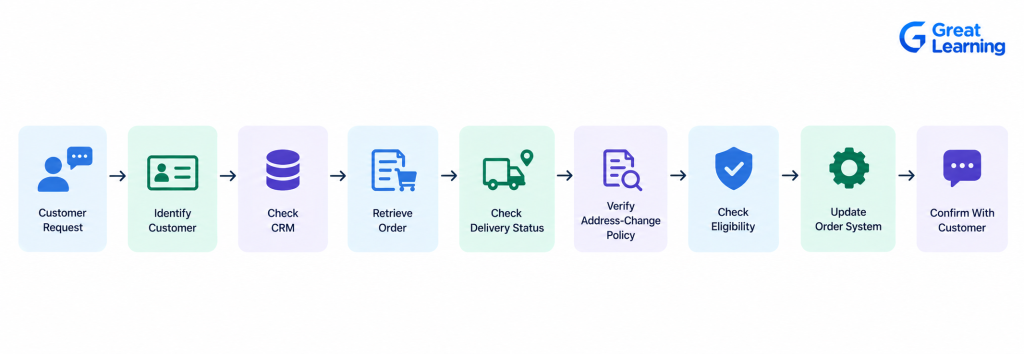
Each step can involve a different enterprise system.
The agent first needs customer context from the CRM. It then retrieves the order from an order management system.
AI agents across enterprise systems
Next, it may search internal policies through Retrieval-Augmented Generation (RAG) to determine whether an address change is allowed.
If the request is permitted, the agent can call the appropriate business API to make the change. If the action requires approval, the workflow can pause and route the request to an employee.
This is the key difference between a standalone AI application and an enterprise AI agent. The agent is not simply generating an answer. It is coordinating information and actions across systems to complete a business task.
How Do AI Agents Decide Which Enterprise System to Use?
An agent working across multiple systems needs to determine what information is required and which tool can provide it.
For example, in an employee onboarding workflow, the agent might use:
| Task | System or tool |
| Verify employee details | HR system |
| Check required documents | Document repository |
| Retrieve company policies | RAG knowledge base |
| Create access request | IT service platform |
| Notify employee | Communication platform |
The agent's reasoning layer connects these steps. It identifies the task, determines what information is missing, selects an appropriate tool, interprets the returned result, and decides what should happen next.
Understanding how to choose an architecture for enterprise AI agents is important for designing this reasoning and interaction layer effectively.
Tool descriptions and permissions are therefore important. An agent should know not only what a tool does, but also when it is appropriate to use it and what actions it is permitted to perform.
Building these systems requires a broad AI agent engineer skills stack, including agent architecture, tool use, APIs, RAG, orchestration, and workflow design.
For complex workflows, an orchestration layer can manage the sequence and state of these interactions.
This prevents the agent from treating every enterprise system as an independent destination and instead allows it to work through the systems as part of one connected workflow.
How Do AI Agents Move Data and Context Across Enterprise Systems?
Connecting an agent to multiple systems is only useful if it can carry the right context from one step to the next.
Consider an insurance claims workflow. The agent may retrieve a customer's policy from one system, claim details from another, supporting documents from a document repository, and policy rules from an internal knowledge base.
The agent needs to combine these inputs before deciding what action to take:
Customer Data + Claim Details + Documents + Policy Rules → Agent Reasoning → Next Action
RAG can provide relevant information from enterprise documents, while APIs and tools can retrieve live information or perform actions in operational systems.
Memory can help the agent retain relevant information throughout a longer workflow.
However, enterprises need to distinguish between information that should be temporarily retained for a task and information that can be stored for future interactions.
The goal is not to give the agent access to everything. It is to provide the specific context required for each step, while maintaining data boundaries between systems.
How Do Enterprises Control AI Agent Actions Across Different Systems?
An agent that can read information across systems and take actions can also create problems if its permissions are poorly designed.
Access should therefore be based on the agent's role and the task it is performing.
For example, an employee-support agent may be allowed to:
- Read employee profile information
- Search HR policies
- Create an IT access request
- Update a support ticket
But it may not be allowed to change payroll information or approve sensitive requests.
This requires controls at multiple levels:
User Identity → Agent Identity → Tool Permission → System Access → Action Approval → Audit Trail
Human approval can be added when an action has significant financial, operational, or compliance consequences.
Enterprises should also record what the agent accessed, which tools it used, what actions it performed, and whether a human approved the action.
This creates traceability across the workflow and makes it easier to investigate incorrect decisions or unexpected behavior.
These controls are essential when building production AI agents, where reliability, access control, monitoring, and traceability need to be considered beyond the initial development stage.
When Should Enterprises Use Single-Agent, Multi-Agent, or Orchestrated Architectures?
Choosing the right architecture for enterprise AI agents depends primarily on workflow complexity, not simply on the number of systems involved. An agent may work across several enterprise applications without requiring multiple agents, as long as one agent can reliably manage the workflow.
A single-agent architecture can be effective when one agent can understand the task, access the required tools, and complete the workflow in a controlled sequence.
A multi-agent architecture becomes useful when different stages of the workflow require specialized capabilities. For example:
Customer Request → Triage Agent → Data Agent → Policy Agent → Action Agent
An orchestration layer can coordinate these agents, manage their state, control the sequence, and determine when the workflow is complete.
| Architecture | Suitable when |
| Single agent | One agent can reliably complete the workflow |
| Multi-agent | Different tasks require specialized agents |
| Orchestrated agents | Multiple agents and tools need coordinated execution |
| Human-in-the-loop | Critical actions require human judgment or approval |
The best architecture is not necessarily the most complex one. Enterprises should start with the architecture that can reliably complete the workflow and introduce additional agents or orchestration only when the business requirement justifies the added complexity.
How Does the IIT Bombay Agentic AI Course Help Professionals Build Enterprise AI Agents?
Building AI agents that work across multiple enterprise systems requires practical knowledge of agent architecture, tool calling, RAG, orchestration, and multi-agent workflows.
The Agentic AI course by IIT Bombay covers these areas through topics such as agent workflows, function calling, RAG, Model Context Protocol (MCP) , LangGraph, CrewAI, planning, reasoning, and multi-agent coordination.
IIT Bombay Certificate in Agentic AI
Master Agentic AI with IIT Bombay. Build dynamic, autonomous agentic systems and master multi-agent orchestration using LangGraph and CrewAI.
The program also covers human-in-the-loop systems, guardrails, access control, prompt injection defense, monitoring, observability, evaluation, and deployment.
These areas are important for designing agents that can interact with enterprise systems while maintaining appropriate controls.
Hands-on projects and guided labs provide opportunities to apply these concepts to practical Agentic AI use cases, helping professionals understand how agents can retrieve information, use tools, coordinate tasks, and complete multi-step workflows.
Final Thoughts
Building AI agents across enterprise systems is not simply about connecting an LLM to more APIs. The agent needs to understand the task, identify the right systems, retrieve relevant context, use tools in the correct sequence, and take actions within defined boundaries.
A reliable enterprise workflow can be viewed as:
Business Task → Context → Tools & Systems → Agent Reasoning → Orchestration → Controlled Action → Monitoring
The architecture should match the complexity of the workflow. A single agent may be sufficient for focused tasks, while complex workflows may benefit from specialized agents and orchestration.
The goal is to create AI agents that can work across existing enterprise systems without losing context, exceeding their permissions, or creating unnecessary complexity.
Frequently Asked Questions
1. What are AI agents that work across multiple enterprise systems?
They are AI agents that can interact with multiple applications, databases, APIs, knowledge bases, and business tools to complete a single end-to-end workflow.
2. How do AI agents connect with enterprise systems?
AI agents can connect through APIs, function calling, databases, enterprise tools, RAG systems, and protocols such as MCP. These connections allow agents to retrieve information and perform authorized actions.
3. Why do enterprise AI agents need access to multiple systems?
Enterprise workflows often depend on information distributed across different systems. Access to these systems allows an agent to combine information and complete tasks rather than simply provide a text response.
4. How does RAG help AI agents work across enterprise systems?
RAG allows agents to retrieve relevant information from enterprise documents and knowledge bases. This can provide the context needed to make decisions alongside information retrieved from operational systems.
5. How can enterprises control AI agent access?
Enterprises can use authentication, role-based access, least-privilege permissions, tool-level authorization, guardrails, human approval, and audit logs to control what agents can access and what actions they can perform.
6. When should an enterprise use a multi-agent architecture?
A multi-agent architecture is useful when a workflow contains distinct tasks that benefit from specialized agents. It should be introduced when the additional coordination provides a clear advantage over a single-agent design.
7. Which course can help professionals learn Agentic AI?
The Certificate in Agentic AI by IIT Bombay is a five-month, live online program from the Department of Computer Science and Engineering, designed for working professionals with prior programming exposure who want hands-on experience with RAG, MCP, LangGraph, and CrewAI.