- What Agentic AI Means in Project Management
- How It Differs From Chatbots and Copilots
- Project Tasks Agentic AI Handles
- Where Human Review Still Matters
- Common Beginner Mistakes
- Simple Example of an AI-Assisted Project Workflow
- How Project Managers Can Use Agentic AI Safely
- Why This Matters Now
- What Project Managers Should Learn Next
- Conclusion
- Frequently Asked Questions (FAQ’s)
Project management is shifting from manual coordination to AI-assisted execution. Microsoft's 2026 Work Trend Index surveyed 20,000 knowledge workers across 10 markets and found that active agents in Microsoft 365 grew 15x year over year. McKinsey reports that almost every company is investing in AI, but only 1% believe they have reached maturity.
That gap matters. Organizations are investing heavily in AI and adopting AI-powered tools at a rapid pace, but many teams still treat AI as a writing tool rather than a workflow partner.
For project managers, the real opportunity isn't faster drafting. It's better planning, cleaner handoffs, earlier risk detection, and more consistent execution.
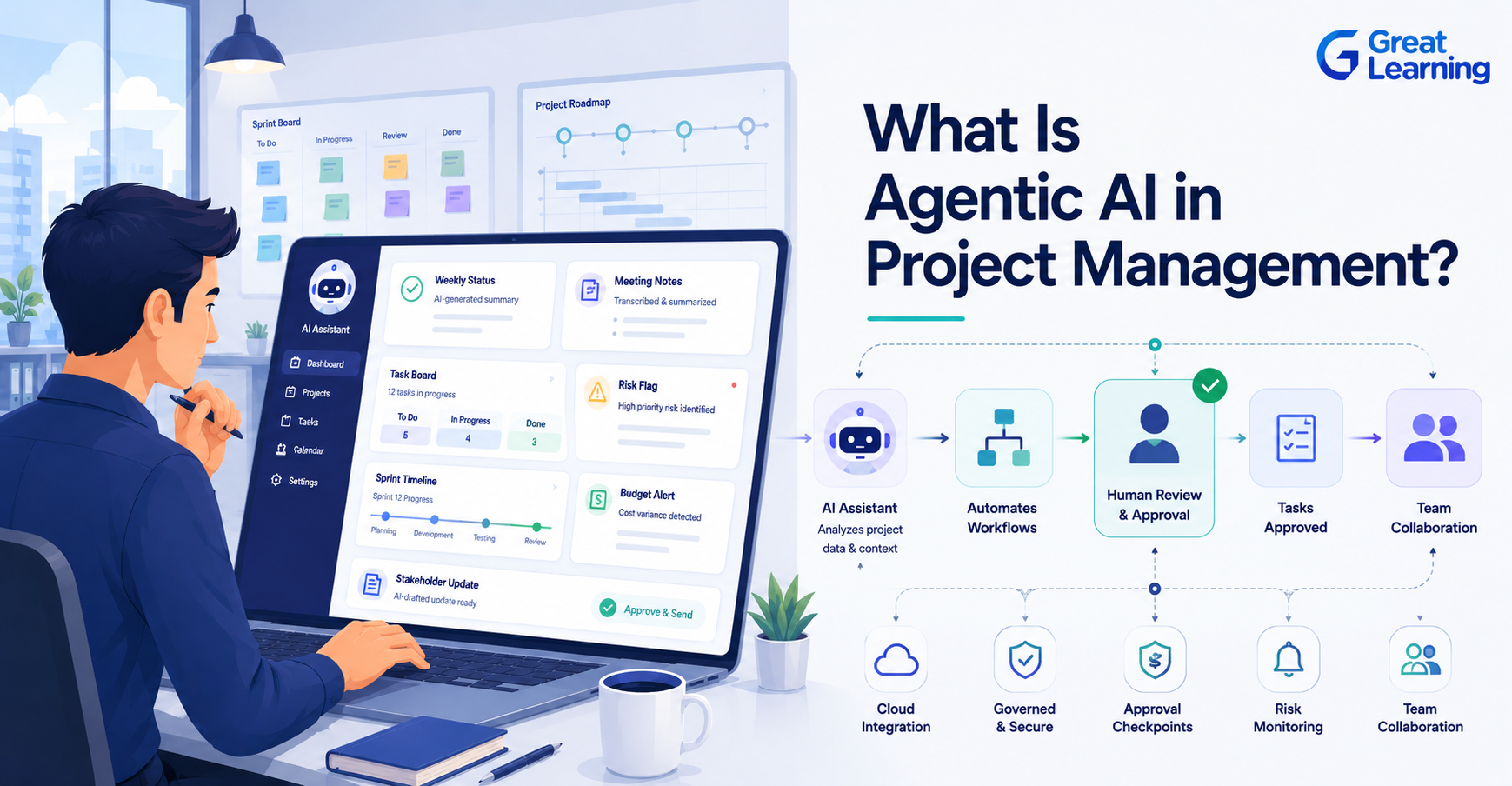
Definition: Agentic AI in project management is AI that can plan work, take actions through tools, monitor progress, and escalate decisions within defined guardrails. It's more than a chatbot because it can participate in a workflow, not just generate text.
What Agentic AI Means in Project Management
Agentic AI is a system that can pursue a goal with some level of autonomy. In project management, that goal might be preparing a weekly status report, flagging schedule risks, updating action items, or summarizing stakeholder feedback.
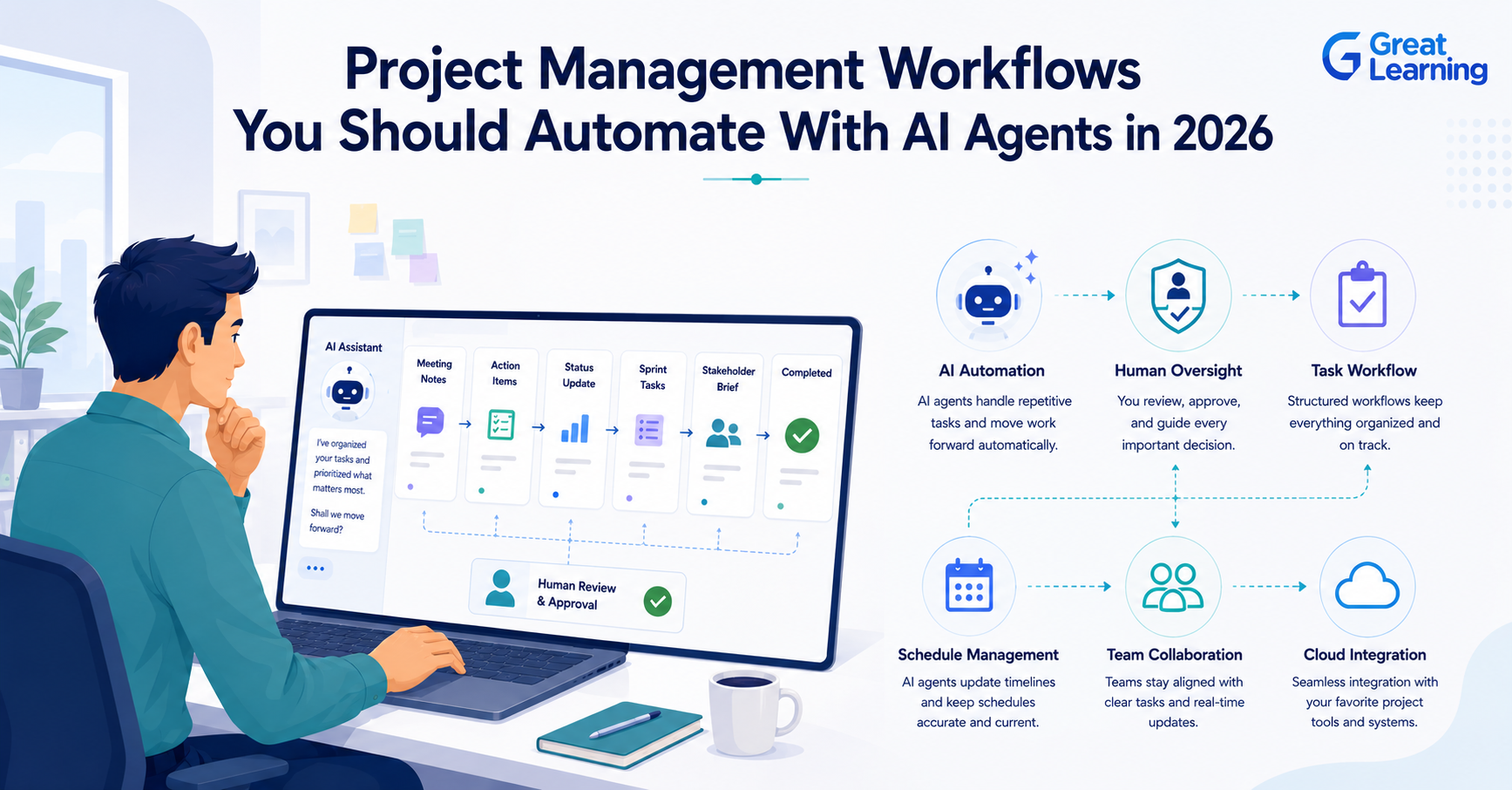
The core idea is simple. The project manager sets the objective, the AI agent helps carry out the work, and the human stays responsible for judgment, approvals, and outcomes.
Here's a simple way to think about it:
- Traditional AI assistant: answers a question or drafts content.
- Copilot: helps the user complete a task.
- Agentic AI: completes parts of a workflow, using tools and rules, then reports back.
That's why agentic AI fits project work better than a simple chatbot. Project management isn't one task. It's a chain of tasks, decisions, reviews, and follow-ups. Agentic AI fits that chain far better than one-off prompt responses.
For a broader look at multi-agent workflows, risks, and outcomes, read our main guide on agentic AI for project managers.
If you want to build AI agents in practice, the Agentic AI Course by JHU is an online program with hands-on projects, expert-led learning, and real-world AI frameworks. It is designed for professionals who want to develop and deploy intelligent AI agents.
Certificate Program in Agentic AI
Learn the architecture of intelligent agentic systems. Build agents that perceive, plan, learn, and act using Python-based projects and cutting-edge agentic architectures.
How It Differs From Chatbots and Copilots
A lot of the confusion comes from treating every AI tool the same way. They're not the same. A chatbot answers questions. A copilot helps inside a document or app. Agentic AI moves through steps, uses tools, and triggers next actions.
| Capability | Chatbot | Copilot | Agentic AI |
| Writes text | Yes | Yes | Yes |
| Uses project data | Limited | Sometimes | Yes |
| Follows a workflow | No | Partly | Yes |
| Takes tool-based actions | No | Limited | Yes |
| Needs human review | Yes | Yes | Yes, by design |
For project managers, the practical difference is control. A chatbot helps you think. An agentic system helps you execute a bounded process. That's why governance matters from the start, not after deployment.
Project Tasks Agentic AI Handles
Project managers don't need AI to do everything. They need it to cut repetitive work and improve visibility. The most useful early use cases are the ones that happen every week and eat up time.
Here are common tasks agentic AI can support:
- Status reporting: by pulling updates from project tools and drafting a clean summary.
- Risk monitoring: by watching changes in timelines, dependencies, blockers, or overdue tasks.
- Meeting follow-up: by extracting action items, owners, and deadlines.
- Stakeholder communication: by turning project data into audience-specific updates.
- Backlog hygiene: by spotting stale items, duplicates, or missing details.
- Timeline nudges: by reminding owners when tasks are at risk.
- Document preparation: by drafting project charters, meeting notes, or weekly summaries.
The best projects to start with are the ones where the process repeats and the review criteria are clear. That's why weekly reporting and action-item follow-up are usually better starting points than budget approval or vendor negotiation.
Where Human Review Still Matters
Agentic AI shouldn't replace a project manager's judgment. It should support it.
Human review still matters when a decision carries business, financial, legal, or people impact. That includes scope changes, budget changes, schedule trade-offs, vendor decisions, compliance issues, and conflict resolution.
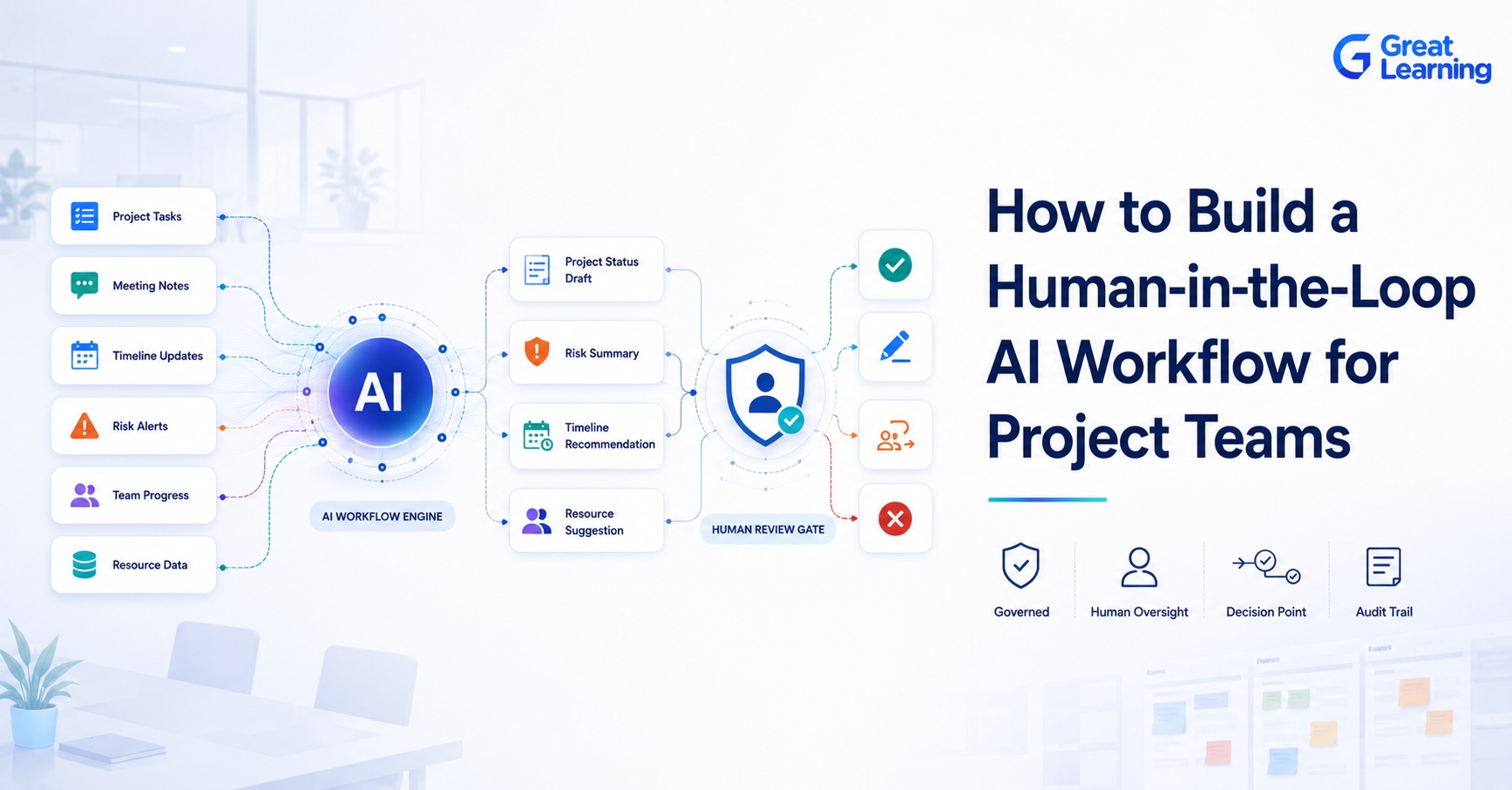
A good rule: let AI prepare, sort, and flag. Let people decide, approve, and explain.
Microsoft's 2026 Work Trend Index shows why this matters. The report found that 49% of Copilot chat use supports cognitive work such as analysis, decision-making, and problem-solving, and that organizations with stronger AI culture and manager support see greater impact than individual effort alone.
In other words, AI works best when the workflow is built around review and accountability, not when it runs without oversight.
Common Beginner Mistakes
Many teams start with the wrong expectations. They expect the tool to act like a senior project manager on day one. That's where the problems start.
Common mistakes include:
- Giving the agent direct write access too early.
- Using unclear prompts with no output format.
- Connecting too many tools before testing one workflow.
- Letting the agent act without approval checkpoints.
- Measuring activity instead of business value.
- Skipping ownership, so nobody is responsible when something fails.
A safer approach is to start small, define the task clearly, and build guardrails before you scale. If a workflow isn't safe when done manually, it isn't safe just because AI is doing part of it.
Simple Example of an AI-Assisted Project Workflow
A practical example is weekly project status reporting.
- The AI agent pulls the latest updates from the task board, shared document, and meeting notes.
- It identifies completed work, blocked items, late tasks, and upcoming milestones.
- It drafts a status report in a standard format.
- It flags anything unusual, such as a new dependency or a slipped deadline.
- The project manager reviews the draft, edits the language, and approves the final version.
- The final report goes out to stakeholders.
This works well as a use case because the workflow repeats, the output is easy to check, and the human still owns the message. The agent saves time, but the PM still controls quality.
How Project Managers Can Use Agentic AI Safely
A simple operating model works well for most teams.
| Task Type | AI Role | Human Role |
| Weekly reporting | Draft and summarize | Review and approve |
| Risk tracking | Monitor and flag | Judge severity and response |
| Meeting follow-up | Extract action items | Confirm owners and deadlines |
| Stakeholder updates | Tailor content | Approve tone and priority |
| Timeline changes | Highlight slippage | Decide trade-offs |
This is where most project teams see value fast. They don't need fully autonomous AI to improve delivery. They need well-designed assistance for tasks that recur every week.
Why This Matters Now
The timing matters. McKinsey's 2025 workplace AI report points to the same pattern. Companies are investing in AI, but very few feel they are mature enough to scale it effectively. For project managers, that means the advantage will go to teams that can combine process discipline with AI fluency.
For project managers, that means the advantage will go to teams that combine process discipline with AI fluency.
What Project Managers Should Learn Next
To work well with agentic AI, project managers need three skills.
- First, workflow thinking. You need to break a process into steps that the AI can support.
- Second, review design. You need to know where a human should check, edit, or approve.
- Third, tool awareness. You need to understand how data moves across tools and where errors can creep in.
This is why the role is changing. The job isn't becoming less important. It's becoming more structured.
Conclusion
Agentic AI in project management isn't about replacing project managers. It's about helping them manage work with more speed, better visibility, and stronger consistency.
The biggest gains usually come from repeatable workflows such as reporting, follow-ups, risk monitoring, and stakeholder updates. The biggest risks come from unclear rules, weak oversight, and too much trust too soon.
For professionals looking to harness AI without coding, the Generative AI course by Johns Hopkins University provides hands-on training in Generative AI, Agentic AI, prompt engineering, AI workflows, and responsible AI, helping learners build practical, business-ready AI solutions using no-code tools.
JHU No-Code Generative AI and Agentic AI
Build practical expertise in Generative AI, intelligent agents, and AI workflows using no-code tools. Automate enterprise-wide workflows without prior programming experience.
Frequently Asked Questions (FAQ’s)
1. What is agentic AI in project management?
Agentic AI in project management is AI that helps carry out parts of a workflow, not just answer questions. It can draft updates, monitor data, and trigger steps in a process, while the project manager still handles review and judgment.
2. How is agentic AI different from a chatbot?
A chatbot responds to prompts. Agentic AI can navigate multi-step tasks, use tools, and support workflow execution. That makes it more useful for repeatable project tasks such as status reporting and risk monitoring.
3. Can agentic AI replace project managers?
No. It can cut administrative work and speed up processes, but project management still needs human judgment, negotiation, stakeholder alignment, and accountability.
4. What is the best first use case for project teams?
Weekly status reporting is usually a strong first use case. It's repetitive, structured, and easy to review, which makes it a low-risk way to start.
5. What should project managers learn before using agentic AI?
Start with workflow design, prompt structure, review checkpoints, and basic tool integration. Those skills help you use AI safely and effectively in real project work.
6. How do teams use agentic AI without creating risk?
Use clear boundaries, approval steps, data access rules, and human review for any decision with business impact. Start small, test one workflow, and scale only after the process is stable.